


Is Acrobat DC Pro required to use AFORMAUTLib in Excel VBA
Good afternoon!
The code below compiles just fine and I have no missing references, but when I reach the For Each block, there are no FormField items to process (and the loop is not entered).
Here are the references:
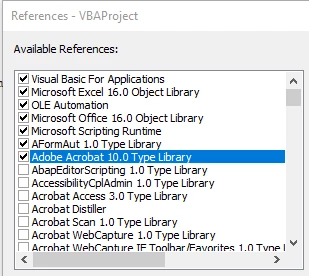
I'm using Adobe Acrobat Standard DC, 2015 Release (Classic) | Version 2015.006.30434. Do I need the Professional version for this code to work?
I've spent the better part of the day trying to figure out what I thought would be a pretty simple task. What I want to do is loop through a list of several hundred PDF files, open them, find a specific text string, modify it, slightly expand the width of the text box that contains it, then save/close.
I've found code to find and select the string (AVDoc.FindText), but nothing that allows me to change it (e.g. A300-000A-T-1 to A300-000A-T-101).
There are some relatively cryptic (cryptic to me anyway) posts out there regarding JSO, but I'm not having much luck with that so far. Most of them talk about adding items to the form, not changing existing ones.
Anyway, I'm surprised that there is not something like "AVDoc.ReplaceText" in the reference document:
https://wwwimages2.adobe.com/content/dam/acom/en/devnet/acrobat/pdfs/iac_api_reference.pdf
That would solve everything.
Thanks in advance!
Public Sub ListPDF_Fields()
Dim AcroExchAVDoc As CAcroAVDoc
Dim AcroExchApp As CAcroApp
Dim AFORMAUT As AFORMAUTLib.AFormApp
Dim FormField As AFORMAUTLib.Field
Dim FormFields As AFORMAUTLib.Fields
Dim bOK As Boolean
Dim sFields As String
Dim sTypes As String
Dim sFieldName As String, PDFPath As String
' For this procedure to work, computer must have a full version
' of Adobe Acrobat installed. Also, a reference to the following
' Type Libraries must be made:
' AFormAut 1.0
' Adobe Acrobat 7.0 (or newer)
On Error GoTo ErrorHandler
PDFPath = Range("B" & ActiveCell.Row)
Set AcroExchApp = CreateObject("AcroExch.App")
Set AcroExchAVDoc = CreateObject("AcroExch.AVDoc")
bOK = AcroExchAVDoc.Open(PDFPath, "") '**************File open is successful
AcroExchAVDoc.BringToFront
AcroExchApp.Hide
If (bOK) Then
Set AFORMAUT = CreateObject("AFormAut.App")
Set FormFields = AFORMAUT.Fields
For Each FormField In FormFields '***************No FormField objects exist for processing!
With FormField
sFieldName = .Name
If .IsTerminal Then
If sFields = "" Then
sFields = .Name
sTypes = .Type
Else
sFields = sFields + "," + .Name
sTypes = sTypes + "," + .Type
End If
End If
End With
Next FormField
AcroExchAVDoc.Close True
End If
Debug.Print sFields
Debug.Print sTypes
Set AcroExchAVDoc = Nothing
Set AcroExchApp = Nothing
Set AFORMAUT = Nothing
Set FormField = Nothing
Exit Sub
ErrorHandler:
MsgBox "FieldList Error: " + Str(Err.Number) + " " + Err.Description + " " + Err.Source
End Sub



 AdChoices