


Known Participant
May 22, 2018
Answered

JavaScript calculations delayed?

  • May 22, 2018
  • 1 reply
  • 2302 views

I have a form that I made through Adobe Acrobat. The second page on this document is basically a giant calculator. I see that my java script is correct and the calculations are correct, but there is somewhat of a delay when it calculates. That is the only way I can explain it. Basically what happens, is I go down my rows and when I have the total calculate everything for me, its off a little. But if I leave it alone and start typing somewhere else, it correct itself. Almost like it didn't fully calculate and was delayed. I don't know if this is a glitch with Adobe Acrobat or if it's something I did wrong. I can't imagine I am doing something wrong because if I use "the value is..." calculation, I get the same thing.

I have a link below to the document if anybody wants to see what I am talking about. It is really weird. The sheet isn't completely done, so go to the second page, and try the section to the right.

https://www.dropbox.com/s/r3f8a69t7i57p3y/Composition%20Job%20Package%20updated%205-18-2018.pdf?dl=0

Any help on this would be greatly appreciated. I feel like I am going crazy with this since I don't know if it's the software or me.

This topic has been closed for replies.
Correct answer Karl Heinz Kremer

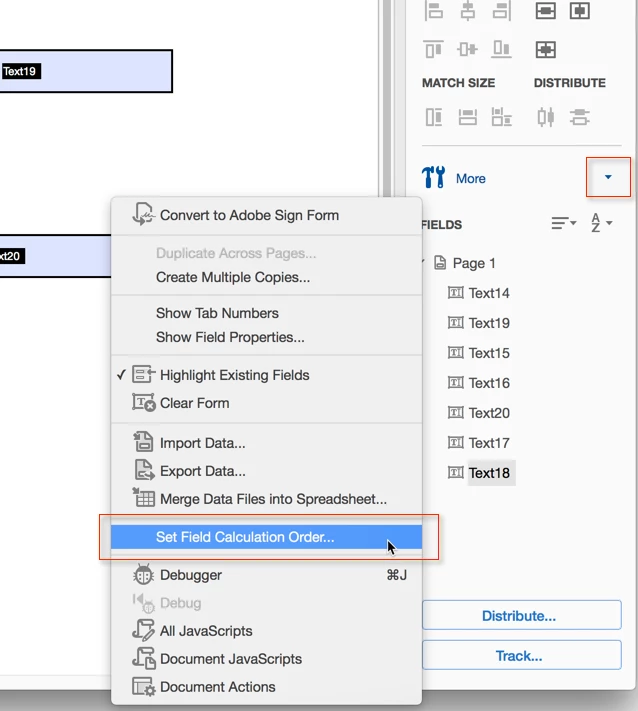
What you describe is caused by the wrong "field calculation order" - that's the order in which fields are getting calculated. You need to arrange the fields so that fields that rely on other fields are getting calculated after the "source fields" are calculated. You can modify the calculation order in Acrobat's form editing mode:

1 reply

Karl Heinz  Kremer
Community Expert
Karl Heinz KremerCommunity ExpertCorrect answer
Community Expert
May 22, 2018

What you describe is caused by the wrong "field calculation order" - that's the order in which fields are getting calculated. You need to arrange the fields so that fields that rely on other fields are getting calculated after the "source fields" are calculated. You can modify the calculation order in Acrobat's form editing mode:

Known Participant
May 22, 2018

I dont see that on my end.

I have adobe Acrobat PRO. Is it maybe located somewhere else?

Karl Heinz  Kremer
Community Expert
Community Expert
May 22, 2018

Actually, you have Adobe Acrobat XI Pro - my screenshot was from the current version Acrobat DC. The "Pro" is not what makes the difference, it's the XI vs. DC. You can find the field order control under the "Other Tasks" menu.