
Participant
July 17, 2019
Question

Javascript checkboxes and hidden fields

  • July 17, 2019
  • 1 reply
  • 625 views

Can anyone help, i have very limited Javascript knowledge. I am setting up a form, with two check boxes as below. When NO is selected then YES is unselected, but also the text fields below to be hidden and when Yes is selected then NO to be unselected and the text fields to be visble.

I can either get the two check boxes to work. or the No to hide the fields, but not both.
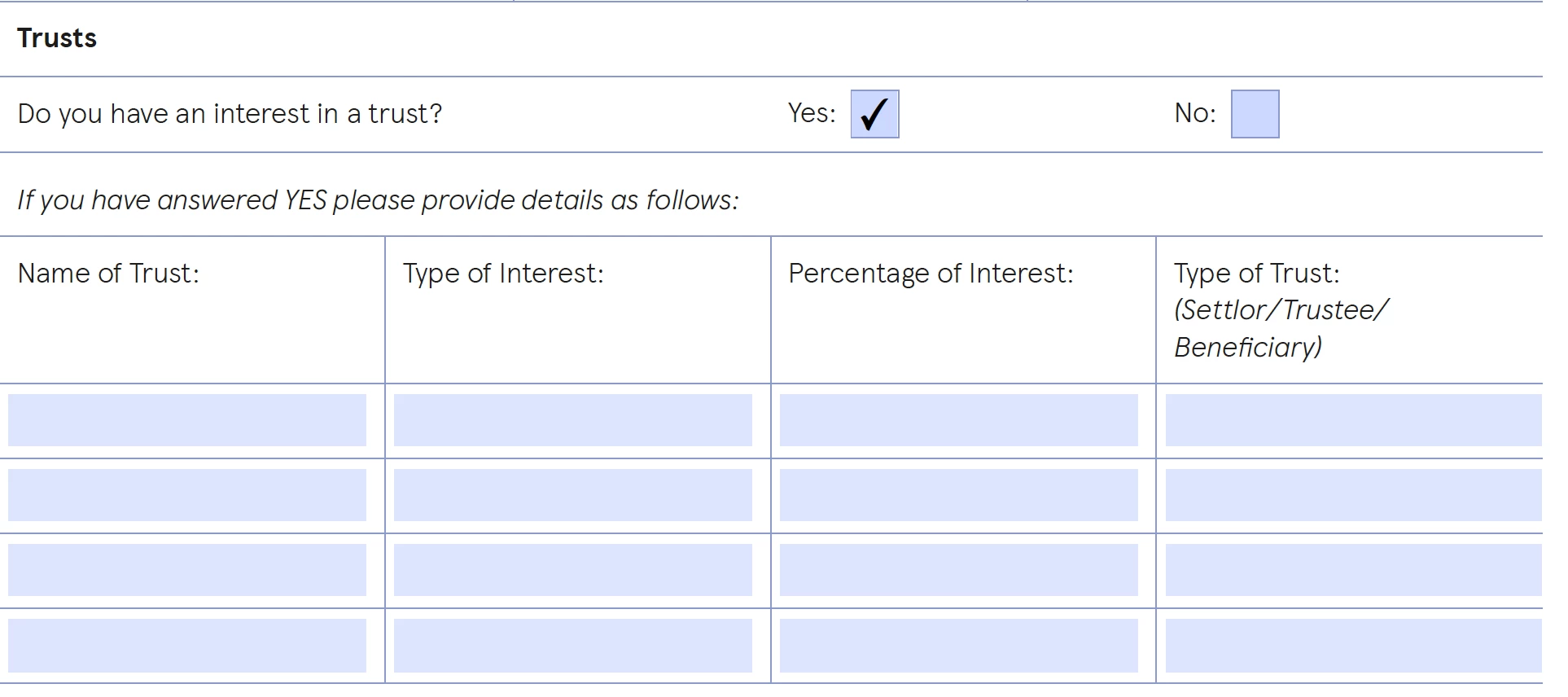
Is anyone able to help.

This topic has been closed for replies.

1 reply

try67
Community Expert
Community Expert
July 17, 2019

You need to give both fields the same name but different export values. That will sort out the first issue automatically.

For the second issue, you need to use a script to do it. See: https://acrobatusers.com/tutorials/show_hide_fields

Participant
July 17, 2019

Thank you try67, I will have a look. I have the check boxes working automatically, and I have a script that can switch the fields off, but when I click NO, it switches the Yes box off, but I have to click no again to get the text fields to switch off.

Below is the code:

if (this.getField("CheckBox8").value=="On") {

this.getField("Text89").readonly = true;

this.getField("Text90").readonly = true;

this.getField("Text91").readonly = true;

this.getField("Text92").readonly = true;

this.getField("Text93").readonly = true;

this.getField("Text94").readonly = true;

this.getField("Text95").readonly = true;

this.getField("Text96").readonly = true;

this.getField("Text97").readonly = true;

this.getField("Text98").readonly = true;

this.getField("Text99").readonly = true;

this.getField("Text100").readonly = true;

this.getField("Text101").readonly = true;

this.getField("Text102").readonly = true;

this.getField("Text103").readonly = true;

this.getField("Text104").readonly = true;

this.resetForm(["Text89", "Text90", "Text91", "Text92", "Text93", "Text94", "Text95", "Text96", "Text97", "Text98", "Text99", "Text100", "Text101", "Text102", "Text103", "Text104"]);

} else {

this.getField("Text89").readonly = false;

this.getField("Text90").readonly = false;

this.getField("Text91").readonly = false;

this.getField("Text92").readonly = false;

this.getField("Text93").readonly = false;

this.getField("Text94").readonly = false;

this.getField("Text95").readonly = false;

this.getField("Text96").readonly = false;

this.getField("Text97").readonly = false;

this.getField("Text98").readonly = false;

this.getField("Text99").readonly = false;

this.getField("Text100").readonly = false;

this.getField("Text101").readonly = false;

this.getField("Text102").readonly = false;

this.getField("Text103").readonly = false;

this.getField("Text104").readonly = false;

}

try67
Community Expert
Community Expert
July 17, 2019

What export values did you set for both fields? What should happen if neither one is selected?