


La-Marie
Known Participant
September 16, 2018
Answered

JavaScript to auto populate one text field with information from 5 dropdown fields

  • September 16, 2018
  • 2 replies
  • 3110 views

I need to have the "Group name" auto populate based on the selections made from the previous 5 dropdown selections. If it stays on "Select one" I need it to not auto populate. Parent site, Subsite 1, and Type will always have a selection made while it is possible no selection is needed for Subsite 2 or 3. Also each selection ends in "-".

If the user selects the wrong dropdown choice and changes it, will the group name field detect the change and auto correct?
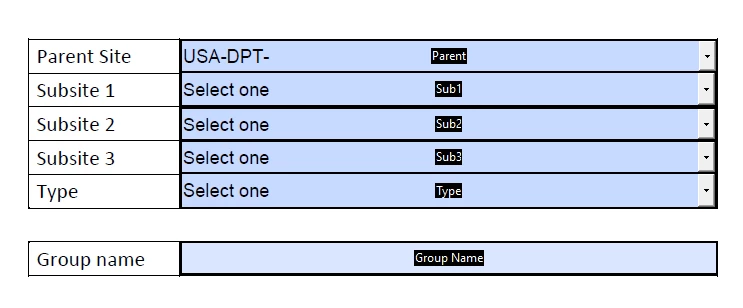
I am using Adobe Acrobat Pro 2017. My limited knowledge of JavaScript is based on this forum. I can usually find what I need searching from previous comments. Thank you for any help you can provide.

This topic has been closed for replies.
Correct answer gkaiseril

I would use an array variable to gather the values from the fields, filter out the "Select one" items, and then join the elements of the array for the "Group Name" field value;

// Custom calculation for the Group Name;

var aElements = new Array();

var aFields = new Array("Parent", "Sub1", "Sub2", "Sub3", "Type");

for(var i = 0; i < aFields.length; i++)

{

aElements.push(this.getField(aFields).value);

}

function NotSelectOne(value)

{

return value != "Select one";

}

var aCombined = aElements.filter(NotSelectOne)

event.value = aCombined.join("");

2 replies

Inspiring
September 16, 2018

There are some points that need to be clarified.

  1. Must all 5 fields be completed?
  2. If not how is the missing data to be handled?
  3. Are the combined entries separated by a symbol of some kind?
  4. Are the values of any of the drop down fields dependent upon the previous field or fields?

There maybe some more advanced scripting than just cut and pasting requried.

La-Marie
La-MarieAuthor
Known Participant
September 16, 2018

Thank you for your reply.

1. Must all 5 fields be completed? No, it is possible subsite 2 and 3 are not needed.

2. If not how is the missing data to be handled?  If the field stays on “Select one” it should be null.

3.Are the combined entries separated by a symbol of some kind?  Each selection ends in “-“ also the Object Type contains words like “Calendar_ATM-“  (Symbols used are - and _ )

4. Are the values of any of the drop down fields dependent upon the previous field or fields? No

gkaiserilCorrect answer
Inspiring
September 16, 2018

I would use an array variable to gather the values from the fields, filter out the "Select one" items, and then join the elements of the array for the "Group Name" field value;

// Custom calculation for the Group Name;

var aElements = new Array();

var aFields = new Array("Parent", "Sub1", "Sub2", "Sub3", "Type");

for(var i = 0; i < aFields.length; i++)

{

aElements.push(this.getField(aFields).value);

}

function NotSelectOne(value)

{

return value != "Select one";

}

var aCombined = aElements.filter(NotSelectOne)

event.value = aCombined.join("");

try67
Community Expert
Community Expert
September 16, 2018

So you just want its value to be the values of all other fields, combined?

La-Marie
La-MarieAuthor
Known Participant
September 16, 2018

Thank you for your reply.

So you just want its value to be the values of all other fields, combined? Yes, except when it stays on select one. I would like the “Select one” to be ignored.

try67
Community Expert
Community Expert
September 16, 2018

1. Must all 5 fields be completed? No, it is possible subsite 2 and 3 are not needed.

So if any of the other fields has the default value selected, it should not display anything?