
Participating Frequently
February 22, 2016
Question

Keychain question on Mac

  • February 22, 2016
  • 4 replies
  • 2849 views

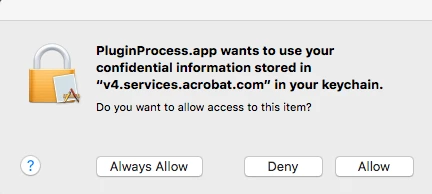
Ok, I have read all of the forums related to this issue and no one seems to have come up with an actual solution. I have the latest versions of OSX and Acrobat DC. In Safari I get the message: "PluginProcess.app wants to use your confidential information stored in "v4.services.acrobat.com" in your keychain" whenever I try and access a pdf online. The three choices are Always Allow, Deny or Allow. Clicking on Always Allow or Allow does nothing. Only clicking on Deny makes the window go away, but that is only temporary. Like many other people you have to click on Deny 5-20 times to get the pop up window to go away.

To Adobe Staff: Your suggestions to click Allow or Always Allow does not work.

I have deleted v4.services.acrobat.com in my keychain, without success (another forum suggestion).

Does anyone have a solution, other than spam clicking Deny?

Edit: I have noticed that it only happens in Safari, not Firefox (haven't tried Chrome yet). Can anyone else with this error confirm whether they are using Safari or not?
This topic has been closed for replies.

4 replies

Participant
November 16, 2024

It happen to me with Firefox as well 😞


Participant
October 13, 2017
vickib16801626
Participant
February 5, 2018

I get the same on Chrome and to no avail have I been able to stop it or remove it.

so frustrating!

Participating Frequently
February 29, 2016

Been there many times Isakten (as well as posting there). However, the staff suggestion there is to click Always Allow, which, I think we have determined, doesn't work. Deleting the entry in keychain also doesn't work. I would really hope that a Staff member from Adobe would take the time to read and answer (with something valid) the discussions/posts on this problem.

Community Manager
February 23, 2016

Hi CSmith1620,

Would request you to please check with the option for 'Allow' so that you access the files & other information.This message appears for authentication purpose.

Please refer to these threads :- https://forums.adobe.com/thread/1812082?start=0&tstart=0

                                              https://forums.adobe.com/thread/1951849?start=0&tstart=0

Regards,

Yatharth

Participating Frequently
February 23, 2016

Thank you YatharthS for not only NOT answering my question but not reading my post. The keychain/error message does NOT allow you to click on "Allow" or "Always Allow". I even said in my post "To Adobe Staff: Your suggestions to click Allow or Always Allow does not work" and you go and suggest I click "Allow". Please read my post and give constructive suggestions instead of the same old solution that doesn't work.