
gregb70136230
Participant
September 13, 2016
Question

Links in PDF form incorrect URLs

  • September 13, 2016
  • 1 reply
  • 2785 views

I've created a PDF with a list of 'results'. Each have a Title, Link, Date and Description.

For some Links, the converted hyperlink in Acrobat Pro / Reader CC is incorrectly appending part of the second line, the Day.

This only happens in Acrobat apps, not Chrome PDF preview or Edge PDF preview.

here is a link to the doc

https://drive.google.com/a/bitvore.com/file/d/0B-_yL1qkqD-_a2oyMWwtLU9iWjA/view?usp=sharing

It is looking like a bug in Acrobat. Does anyone know why this might be happening?
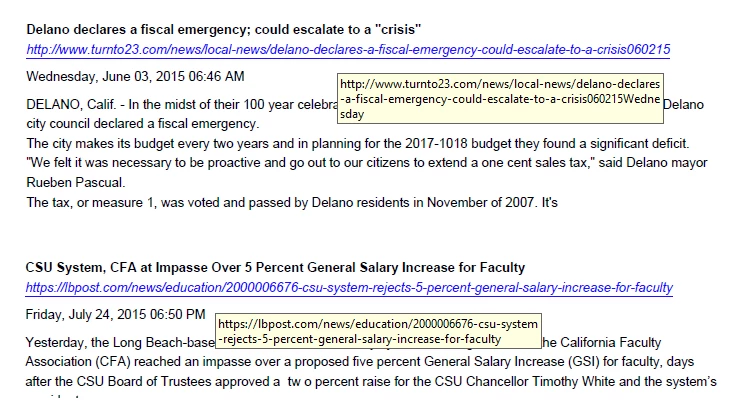
!

This topic has been closed for replies.

1 reply

Inspiring
September 13, 2016

The document isn't accessible.

Are these actual links annotation that are included in the document or is it using Acrobat's ability to automatically detect web links (Edit > Preferences > General > Create links from URLs)? If the latter, you might try adding actual links to see if it makes a difference.

gregb70136230
Participant
September 14, 2016

These are not actual configured hyperlinks, but Acrobat automatically detecting web links from text.

http://s000.tinyupload.com/?file_id=08655352023348298088

Attachment updated.

mattl90946033
Participant
January 7, 2019

We are having the same issue. How does the link parsing work? The only thing that seems to work for us is to put a comma at the end of the URL which seems to tell the parser to stop parsing.. however it looks silly to have a comma at the end of a paragraph. A # also works but then the proceeding text is all linked till it reaches a comma (just like Greg's picture above - the link ends at the first comma).

Just a note, our pdf is auto-generated from a closed system, so we don't have any other options regarding link creation.