



JR Boulay
Community Expert
Community Expert
March 1, 2018
Answered

Loop edit fields

  • March 1, 2018
  • 4 replies
  • 1020 views

Here is a sample script that loop into form fields to edit some properties:

for (var i = 0; i < numFields; i++) {

    var fName = getNthFieldName(i);

    var f = getField(fName);

    if (f.type === "text") {

        f.textFont = font.Times;

        f.textSize = 9;

    }

}

It works fine as long as there is no field using the Acrobat Forms Field Hierarchies.

(text.0, text.1, text.2, and so on)

If there are any in the form I get this error: f is null
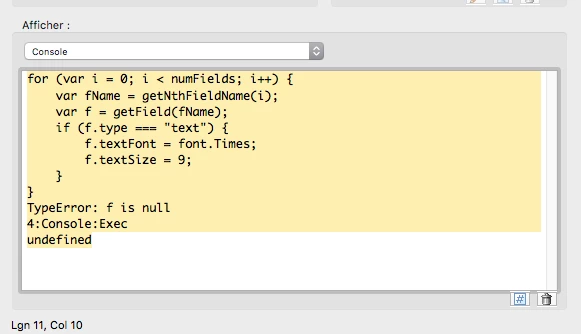
My question is: Is it possible to use a script that can edit properties by looping into all forms fields, using the Acrobat Forms Field Hierarchies or not?

This topic has been closed for replies.
Correct answer try67

I've seen this happen with corrupt fields, especially those that were created in InDesign. Karl's recommendation should help solve it.

4 replies

JR Boulay
Community Expert
JR BoulayCommunity ExpertAuthor
Community Expert
March 3, 2018

Good point: it's a file issue.

I cannot share it but it was made from Powerpoint and form fields were added using PDF Converter.

With Acrobat Pro I removed some listboxes and form fields and replace them by new ones using the hierarchical naming.

This is why I wanted to batch edit fields that were previously created since they don't use the right font.

So I found a workaroud: I cut my hierarchical fields, I process the loop to edit previously created fields, and then I paste my fields back.

;-)

Thank you!

Acrobate du PDF, InDesigner et Photoshopographe
JR Boulay
Community Expert
JR BoulayCommunity ExpertAuthor
Community Expert
March 2, 2018

I made these forms fields with Acrobat Pro DC, files was not made with InDesign.

Using Karl's debug tip I can see that the loop works fine, processing fields in alphabetical order until the first field that use the hierarchical naming.

Then it returns : f is null and it stop processing.

Acrobate du PDF, InDesigner et Photoshopographe
try67
Community Expert
Community Expert
March 2, 2018

Can you share the file and the full code you're using?

try67
Community Expert
try67Community ExpertCorrect answer
Community Expert
March 1, 2018

I've seen this happen with corrupt fields, especially those that were created in InDesign. Karl's recommendation should help solve it.

Karl Heinz  Kremer
Community Expert
Community Expert
March 1, 2018

I've never had a problem with this. I would add the following for debugging purposes: Add a line that prints which form field is being processed to see what the name of the field is that triggers the error. You can also add a check to the "if" command to make sure that you are not processing a null field:

if (f != null && f.type == "text) {

....

}