Participant
July 28, 2016
Question

LOTS of problems with Adobe on Macbook

  • July 28, 2016
  • 1 reply
  • 356 views

All functions including export PDF, Fill & Sign do not show up on the side bars.

The "Sign" dialog box is blank, and I am unable to create and signatures as well as place any signatures.
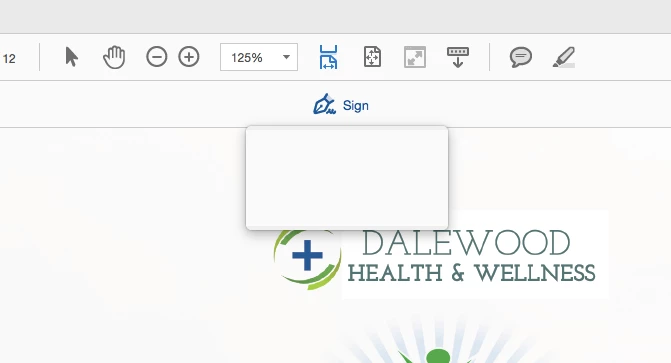
The program is absolutely incompatible with macbooks. Please fix this or do not even have it available for download as it is just silly.

This topic has been closed for replies.

1 reply

Karl Heinz  Kremer
Community Expert
Community Expert
July 28, 2016

It looks like you are using Acrobat DC - it is definitely compatible with Mac OS X:

You are very likely running into a problem with your local installation. Have you tried to uninstall and re-install? Unfortunately, on the Mac we don't have the same feature as Windows users have that allows us to repair our Acrobat installation.

Which version of Mac OS X are you using?

kehwonAuthor
Participant
July 28, 2016

Hi Karl,

I have tried uninstalling and re-installing. I have also tried to install the Segoe fonts that has been suggested by some other forum users.

I'm currently using OS X El Capitan, Version 10.11.5

By not being compatible, I mean why do these features even show up on the mac version if they're not available at first installation? Otherwise it would serve more useful to actually create a download file with all the repairs you would need in a zip file then. Not making it user-friendly is terrible.

Further, on a different note, Adobe has never been very compatible with mac. in that other programs are not mac compatible, eg: you can't install photoshop on a case-sensitive HD...

Karl Heinz  Kremer
Community Expert
Community Expert
July 28, 2016

All I can say is that I've been running Acrobat on a Mac since (I think) Acrobat 8 without any major  problems. Acrobat DC is supported on El Capitan. You do however have to make sure that you update to the latest version of DC (via the "Check for updates" function in Acrobat's Help menu).

What you are seeing is specific to your system, and it should work (and does so on may Macs). All features that show up on the user interface should work, there is nothing that gets displayed that is not available on a Mac. You've already covered the font issue (even tough, based on your screen shot, I don't believe it looks like the font issue). You can try to reset Acrobat's configuration by removing the Plist file /Users/<your user name>/Library/Preferences/com.adobe.Acrobat.Pro.plist - I would not delete it outright, but rename it so that I could potentially go back to it. To do that, shut down Acrobat, then rename the file and start Acrobat again. This will create a new version of this file.

If that does not work, because this is not a simple configuration issue, this may be one of the cases when  you have to get in touch with Adobe's support: http://helpx.adobe.com/contact.html (don't use any of the "Forum" options, otherwise you will end up here again)