
Inspiring
February 22, 2016
Answered

Missing this option: "Open documents as new tabs in the same window"

  • February 22, 2016
  • 8 replies
  • 12221 views

I have Adobe Acrobat DC (Classic) Version 2015.006.30119.

I saw that there is a feature under Edit > Preferences > General called "Open documents as new tabs in the same window," however, I am missing this option. 

Is it not available in the Classic track? 
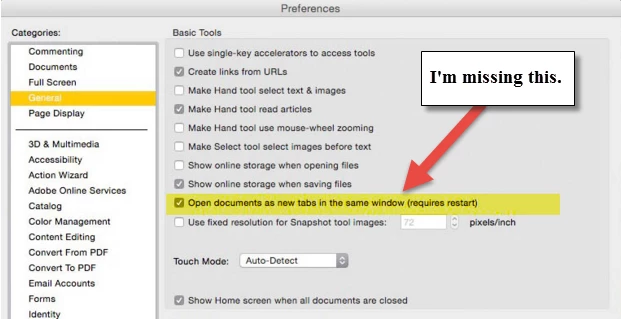
(Image taken from another post.)

This topic has been closed for replies.
Correct answer Test Screen Name

Are you sure, sukritd15, that it appears in the Classic track? I have heard it said that tabs are definitely not in the Classic version, and will not available to people with permanent license until the next paid upgrade, only subscription. And according to Adobe - Acrobat : For Windows is the latest version.

8 replies

Participating Frequently
September 1, 2023

Another six year old thread of people looking for this feature and failling to find it, still six years later - 2023 version of reader, option missing. 

Bernd Alheit
Community Expert
Community Expert
September 1, 2023

This feature is available in Acrobat with the old UI. 

Participating Frequently
September 1, 2023
So I can "revert" to the old version, or tell the new version I want the
old i/f ?
cypressdrive
Participant
February 28, 2023

I added a reply a couple weeks back that was as much a rant as a reply. I have since discovered something. My Intel MacBook Acrobat Pro install still has the "open docs as new tabs" option whereas my M1 MacBook doesn't. There are other differences in the preferences as well. According to the About Acrobat info I have the same version on both MacBooks. It isn't related to the enable native OS mode on the M1 install as far as I can tell.


I did some web searches but I haven't learned why the two installs are different but it must be an Intel vs Apple Silicon thing.

Participant
February 28, 2023

hi jazman 

cypressdrive
Participant
February 22, 2023

I just have to reply to this. Adobe have always found different ways to piss me off since computers and Adobe were invented. The tabs are annoying andI can't get rid of the Welcome to Acrobat screen either with all my recent files and cloud storage and request e-signatures and crap I DON'T WANT.  HEY ADOBE, I don't want the screen and I can't make it go away anymore either. And you automatically added update my system. Who asked you to? Really? That's my decision, not yours. I don't feel better after this but Adobe overprices and under-delivers. Their support is poor and now I have an upgrade with new "features" I can't seem to avoid.

Green One
Participating Frequently
February 15, 2023

I like new interface, but a fact you cannot use no-tab option is a No-No-No-No for me...

Switching back to old style then...


Thanks.

Participant
January 28, 2023

I also do not have this option. I am running Adobe Acrobat Pro 2022.003.20310 on a mac. I have a creative cloud subscription. I want to find this checkbox in order to NOT use tabs. 

Legend
January 28, 2023

I think Adobe are moving away from any option to not use tabs. You can split tabbed windows by dragging out, but always tabbed. So far as I know.

Participant
January 28, 2023
I understand, but yesterday my Acrobat would open as windows based on my
settings. And today I can't even change the setting to take away the tabs
default. It's rather frustrating.
Legend
December 20, 2016

We expect at some time you will be able to buy an upgrade to a permanent license with this feature, but there is no announcement about this.

Participant
December 20, 2016

I'm also missing this feature. Was there any resolution to this?

February 22, 2016

Hi ,

Please check if you are updated to the latest patch.

This option does appear in both Continuous and Classic track.

What OS do you work on?

Regards

Sukrit Dhingra

Test Screen NameCorrect answer
Legend
February 22, 2016

Are you sure, sukritd15, that it appears in the Classic track? I have heard it said that tabs are definitely not in the Classic version, and will not available to people with permanent license until the next paid upgrade, only subscription. And according to Adobe - Acrobat : For Windows is the latest version.