
Participant
August 12, 2016
Question

My document properties aren't saving with the file

  • August 12, 2016
  • 2 replies
  • 735 views

I've created a book in InDesign and exported it to Adobe Acrobat Pro X. Under File: Properties: Initial View I have the following settings (see below), but when I send the document to anyone else and they open the document with an Adobe Reader or Acrobat Pro, the properties don't stick. They still see the document as a single page continuous document. What am I doing wrong?
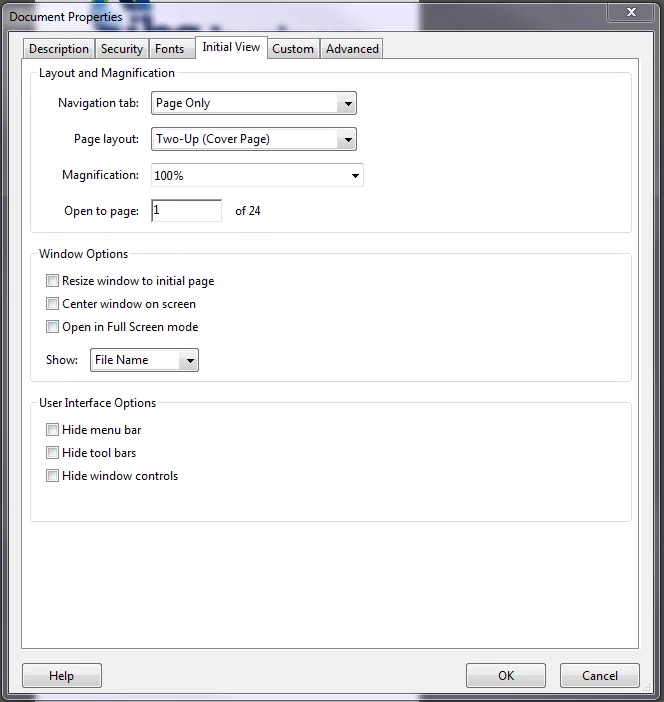
This topic has been closed for replies.

2 replies

Participant
August 12, 2016

After talking it over with my web page designer, here's what we figured out. When I export the document from In Design to Acrobat I need to make sure that I have clicked spread instead of pages. Once I did this, it worked.

Dov Isaacs
Legend
August 12, 2016

Can we assume that you are setting these properties in Acrobat and then saving the PDF file?

Also, are you claiming that recipients of your PDF file are seeing it as a single page as opposed to 24 pages?

What happens if you send the PDF file to yourself and open the attachment in Acrobat? I assume that displays correctly?

          - Dov

- Dov Isaacs, former Adobe Principal Scientist (April 30, 1990 - May 30, 2021)
Participant
August 12, 2016

Dov -

No, I'm exporting the document to Adobe Acrobat from Adobe In Design and setting the parameters in there. Once the document has been exported I am then changing the document properties in Acrobat.

No, I said they're seeing it as a single page continuous document, meaning that they see one page and then can continuously scroll to the next, for the entire 24 pages

Yes. It displays appropriate for me.

try67
Community Expert
Community Expert
August 12, 2016

Are you 100% sure the users are actually opening the file in Adobe Acrobat or Reader, and not inside a browser window, for example?