


scott_ridings
Participant
January 11, 2016
解決済み

Need reference library acroexch.dll I need this to do some automation for Excel to PDF. What product is this file in or where can I get it?

  • January 11, 2016
  • 返信数 9.
  • 9985 ビュー

I need this to do some automation for Excel to PDF. What product is this file in or where can I get it?

このトピックへの返信は締め切られました。
解決に役立った回答 Karl Heinz Kremer

Thank you so much for your reply! It still didn't work though. Maybe there is another problem.

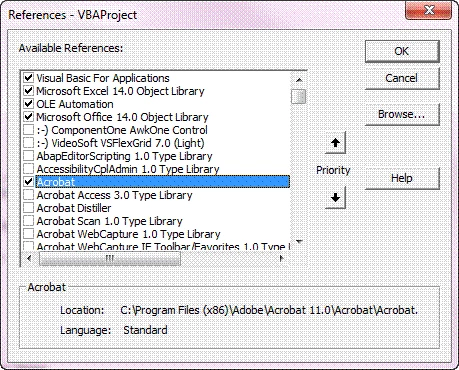
I checked the box for the reference.

Then I got This

any Ideas?


The correct function is "CreateObject" - you have it misspelled.

返信数 9

Legend
January 11, 2016

This is part of Acrobat Pro and Acrobat Standard. It is not redistributable.

scott_ridings
scott_ridings作成者
Participant
January 12, 2016

Do know what the name of the reference library is? When I'm in Excel's Visual Basic Editor and scrolling through the reference library I have checked every box that says Adobe, Acro, or PDF and it still doesn't work. and I don't know why. Below is the code.

Sub ReadAdobeFields()


    ROWnum = 1

    Dim AcrobatApplication As Acrobat.CAcroApp
    Dim AcrobatDocument  As Acrobat.CAcroAVDoc
    Dim Fcount As Long
    Dim FieldName As String
   
    On Error Resume Next
    Set AcrobatApplication = CreatObject("AcroExch.App")   '<----- this is where it messes up it says "SUB or FUNCTION is not defined". It's because I don't have the correct reference library
    Set AcrobatDocument = CreatObject("AcroExh.AVDoc")
   
    If AcrobatDocument.Open(Range("C:\288701\Desktop\Test.pdf"), "") Then
        AcrobatApplication.Show
        Set AcroForm = CreateObject("AFormAut.App")
        Set Fields = AcroForm.Fields
        Fcount = Fields.Count
       
        For Each Fielf In Fields
            FieldName = Fields.Name
           
            ActiveSheet.Range("B" & ROWnum) = Field.Name
            ActiveSheet.Range("C" & ROWnum) = Field.Value
            ActiveSheet.Range("D" & ROWnum) = Field.Style
        Next
       
    End If

End Sub

When I'm checking these boxes what is the name?

Any help you can give would be very helpful? Thanks!

Participant
June 26, 2019

Great!!!!

I wonder if its posible to get more info from the fields (Name, Value, Style), like de # or the page. I was looking in the web, but no succes.