
Need to add to a javascript but not sure how to
At the start, the fields on the below screenshot are all hidden apart from the Term box.
The script below sits in the custom validation field of the term box and adds ticks and makes visible certain fields if a term of under 2 is entered. It does differenet tick boxes etc if a term of 2 or over is entered. There is also a mouse up action that ticks all boxes if C is ticked. This all works perfectly.....
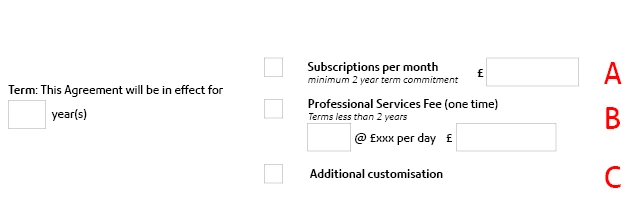
What I would like to do, but for the life of me cannot work out what I need to add, is for all the fields (except the term box) to reset to hidden if the term box is either blank or someone types 0.
if ( !this.getField("checkbox_c").isBoxChecked(0)) {
if ( event.value < 2) {
this.getField("checkbox_a").checkThisBox(0, false);
this.getField("checkbox_b").checkThisBox(0, true);
this.getField("checkbox_c").checkThisBox(0, false);
this.getField("checkbox_a").display = display.hidden;
this.getField("checkbox_c").display = display.hidden;
this.getField("SubsPerMth").display = display.hidden;
this.getField("checkbox_b").display = display.visible;
this.getField("ProfServices").display = display.visible;
this.getField("ProfservicesTotal").display = display.visible;
} else {
this.getField("checkbox_a").checkThisBox(0, true);
this.getField("checkbox_b").checkThisBox(0, false);
this.getField("checkbox_c").checkThisBox(0, false);
this.getField("checkbox_a").display = display.visible;
this.getField("checkbox_c").display = display.visible;
this.getField("SubsPerMth").display = display.visible;
this.getField("checkbox_b").display = display.hidden;
this.getField("ProfServices").display = display.hidden;
this.getField("ProfservicesTotal").display = display.hidden;
}
}


 AdChoices