


samuelt6641188
Participant
April 11, 2017
Question

Never Prints OCG property

  • April 11, 2017
  • 2 replies
  • 558 views

Greetings,

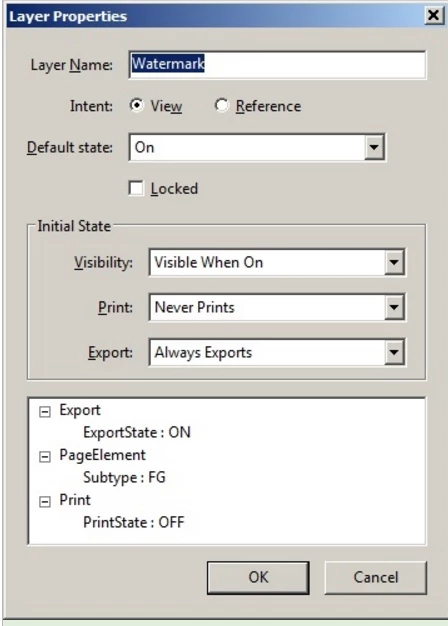
Newbie here. Is there a way in JavaScript to programmatically set the initial state of print to Never Prints in the layer properties?

I manage to hide OCG layers (watermark) and I don't want it to be printed.

Is there a function or script that I can use to do that?

Thank you.
This topic has been closed for replies.

2 replies

JR Boulay
Community Expert
Community Expert
April 11, 2017

Hi.

I'm not sure why you want to change the layer's name, if you want to hide the watermark layer you can use something like this:

var ocgArray = this.getOCGs(this.pageNum);

for (var i=0; i < ocgArray.length; i++) {

    console.println("This layer is " +  ocgArray.name);

    if (ocgArray.name == "Watermark") {

        ocgArray.state = !ocgArray.state;

    }

}

Acrobate du PDF, InDesigner et Photoshopographe
samuelt6641188
Participant
April 11, 2017

Users need to reprint over and over again the same document with different

watermarks. However, the script does turn off only the visibility but print

the watermarks on top of each other. What we do now is run the script once

and then close without saving, reopen then re-run the script to have a

different watermark. Changing the properties in GUI is not an option.

try67
Community Expert
Community Expert
April 11, 2017

I don't think that's possible to do using JS, no.

try67
Community Expert
Community Expert
April 11, 2017

The only way is if you create that layer using addWatermarkFromFile or addWatermarkFromText... If you use those methods then you can set the bOnScreen and bOnPrint parameters to determine whether the OCG they create should appear on the screen and/or on the printed copy, respectively.