
Participant
September 29, 2020
Question

Not counting hours correctly

  • September 29, 2020
  • 1 reply
  • 329 views

I have created a time sheet but it is not converting the time correctly, for instance clock in at 8:00 and clock out at 4:00 it is reading that as 12 hours and not just 8 hours like I need it to. I am using Adobe Acrobat DC Pro.

I have followed this tutorial https://acrobatusers.com/tutorials/date_time_part1/index.html but it has really not got me anywhere. Any help will be appreciated
 

This topic has been closed for replies.

1 reply

ls_rbls
Community Expert
Community Expert
September 29, 2020

Saying that you followed that tutorial doesn't help .


You need to post your code and maybe  even share a sample of the file to have someone to review it.

Participant
September 29, 2020

Sorry, I will try to re-phrase this as easy as possible. I don't understand where to enter any code from that tutorial, I also don't know what to do to change the system from reading this as a 8:00 + 4:00 = 12. I want it to read time as I worked 8 hours.

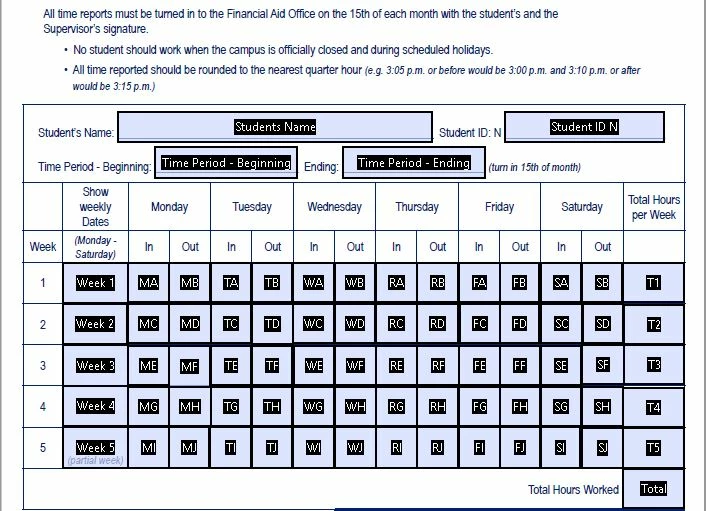
Attached is how I adding up the weeks. 


ls_rbls
Community Expert
Community Expert
September 29, 2020

Then in that case you're not following the tutorial. The tutorial is focusing on implementing JavaScript scripting.


When you work with times in Acrobat, such as hours and minutes, those values are dependent on the date.


The date arithmetic is different from the basic arithmetic that you're currently using with the built-in "sum" function.


What do you have in the Format tab for each of the "In" and "Out" fields in your form? Are they formatted as numbers, as hours and minutes, or no formatting at all?