


August 24, 2016
Question

OCR Question

  • August 24, 2016
  • 1 reply
  • 718 views

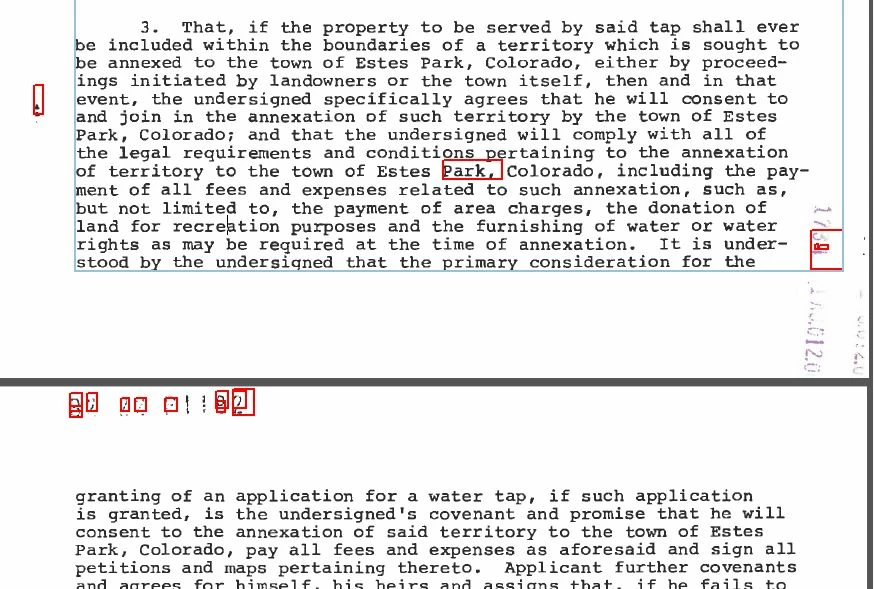
Can anyone explain why the OCR would capture the word "Park," and the comma, but ignore every other word on the page?  I find this all the more perplexing in that it read the barely legible reception number on the next page(didn't read it right, but I can still go edit it to be correct) but failed to capture any other words.  Sometimes this is very frustrating in that the word I am searching for may literally be right next to a word that got OCR no problem.  Forgive me if this topic has already been tackled.  It just seems that if resolution or dpi were the issue, I wouldn't get much of anything.  Is there a way to manually add OCR where Adobe misses it?  Also, why would it get one "Park," but not all of them.  They are practically identical.  Help!
This topic has been closed for replies.

1 reply

Lovekesh Garg
Adobe Employee
Adobe Employee
August 25, 2016

Hi Jesse,

Here Acrobat must recognize other words as well. What you are seeing in red boxes, are the words where Acrobat is not sure it recognize the word correctly or not. So this word is marked as suspect. Now you can manually correct this word from

1. Go to Enhance Scans> Recognize Text > "Correct recognize Text" after running OCR

2. Select any red box, now this word will be available in toolbar. Original "Image" and "recognized as"

3. You can enter correct text for this image if Acrobat recognize it incorrectly and then Accept.

Also you can see what all recognized by Acrobat. For this select checkbox "Review Recognized text".

Here is a sample image where "be offered" is recognized as "b~offered". We can manually change it and accept.

"Review Recognized text" option is available at top Left corner of toolbar to see all recognized text.

Hope it will resolve your issue. Please let us know if you still face any problem.

Thanks.

August 25, 2016

Hi,

That doesn't really answer my question.  In my job, some days I just correct the words that were not recognized correctly by adobe.  That tends to be the majority due to the age of the documents I am working with.  So I have literally done exactly what you have given me instructions for, tens of thousands of times.  Maybe hundreds of thousands, I don't keep track.  What I would like to be able to do is at the very least, add recognition to words on the page that aren't even red-boxed as suspects.  Words that were missed or ignored entirely.  Can anyone help with that.  What I really want to know is why it doesn't red-box every word on the page.  Why does it get one "park" but not the other six?  Most importantly, can I add words that were missed or is this as good as it gets?

Lovekesh Garg
Adobe Employee
Adobe Employee
August 25, 2016

Sometimes it's not able to recognize text for some specific fonts, dark background, very large text or low DPI image.

Can you please share a sample document where you are facing this issue.

You can use https://cloud.acrobat.com/send for sharing the file.

Thanks.