


October 7, 2016
Answered

Opening Word Documents but open up in PDF

  • October 7, 2016
  • 1 reply
  • 547 views

I have Adobe Acrobat XI Standard installed to make PDF's. That process works. But whenever I want to open downloaded MS Word files or Powerpoint files, they open as a PDF which I don't want - I want the Word or Powerpoint file. Is there some "preference" or process I can do to make sure Word files always open in Word and Powerpoint files are always opened in Powerpoint?

This topic has been closed for replies.
Correct answer philippanmei

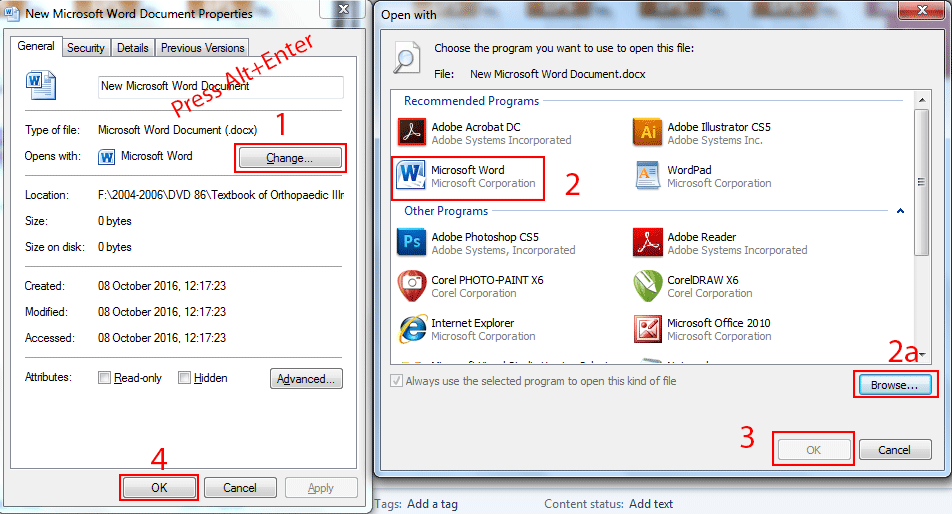
Click on the file (do not open up) and press Alt+Enter, the document properties will open up. Now you can change the open with option by click on change button and choose your desire application that matches it or click on browse button if it is not there and click Ok and OK see the images

Press Alt+Enter on the document

Option  1. Change button (This will allow you to choose your desire application)

2. Open with (here you will find the open with application)

2a. Browse button (if you didn't find any application on the recomended programs or other programs then click on browse button and choose the application)

3. OK button (After selected the programs click on OK button and so as no. 4)

Thanks

1 reply

philippanmei
philippanmeiCorrect answer
Participating Frequently
October 8, 2016

Click on the file (do not open up) and press Alt+Enter, the document properties will open up. Now you can change the open with option by click on change button and choose your desire application that matches it or click on browse button if it is not there and click Ok and OK see the images

Press Alt+Enter on the document

Option  1. Change button (This will allow you to choose your desire application)

2. Open with (here you will find the open with application)

2a. Browse button (if you didn't find any application on the recomended programs or other programs then click on browse button and choose the application)

3. OK button (After selected the programs click on OK button and so as no. 4)

Thanks