May 2, 2016
Answered

PDF not created error msg=%%[ ProductName: Distiller ]%% X3E7FDE4B not found, using Courier. X66AD78F3 not found, using Courier. X9BA8CAFE not found, using Courier. X639D8030 not found, using Courier. %%[Page: 1]%% X3680445C not found, using Courier.

  • May 2, 2016
  • 2 replies
  • 31001 views

Why can't I create pdf any more

This topic has been closed for replies.
Correct answer Dov Isaacs

The symptoms sound like you have a PostScript file being distilled for which the fonts were embedded in the PostScript but are not actually being used by the Distiller. One situation that could cause this is an option, on by default, for the Adobe PDF PostScript printer driver instance.

Go to the Printer Control Panel and right click on the Adobe PDF printer and click Properties. Go to the Advanced tab and click on Preferences. Click on Printing Defaults and select the Adobe PDF Settings tab.
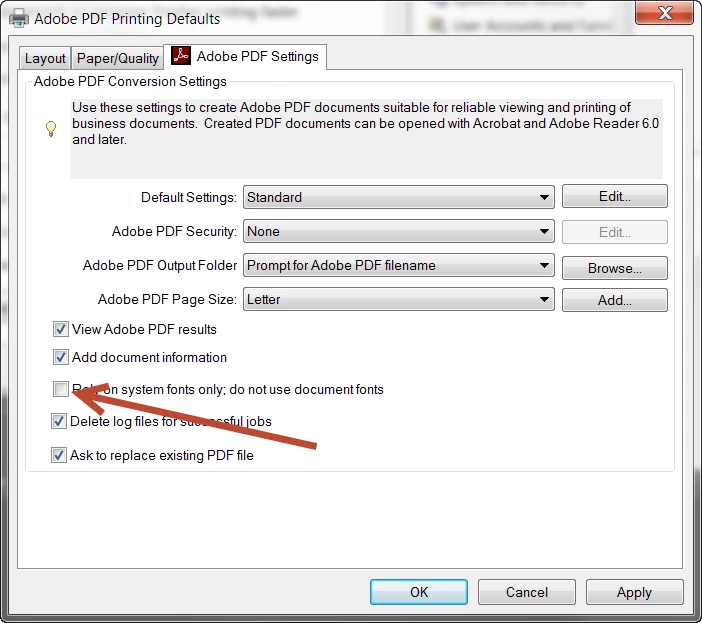
In that dialog, make sure to deselect the Rely on system fonts only. Do not use document fonts option. (See below, pointed to by arrow!) Press OK all the way back to the Printer Control Panel. Restart the application from which you were trying to create PDF via Adobe PDF and see if that resolves the problem.

          - Dov

2 replies

Dov Isaacs
Dov IsaacsCorrect answer
Legend
May 2, 2016

The symptoms sound like you have a PostScript file being distilled for which the fonts were embedded in the PostScript but are not actually being used by the Distiller. One situation that could cause this is an option, on by default, for the Adobe PDF PostScript printer driver instance.

Go to the Printer Control Panel and right click on the Adobe PDF printer and click Properties. Go to the Advanced tab and click on Preferences. Click on Printing Defaults and select the Adobe PDF Settings tab.

In that dialog, make sure to deselect the Rely on system fonts only. Do not use document fonts option. (See below, pointed to by arrow!) Press OK all the way back to the Printer Control Panel. Restart the application from which you were trying to create PDF via Adobe PDF and see if that resolves the problem.

          - Dov

- Dov Isaacs, former Adobe Principal Scientist (April 30, 1990 - May 30, 2021)
Participant
January 15, 2024

Update for 2023 and future problem solvers:

This solution worked for Aptos, the new default font from microsoft. My system log file was saying "Aptos not found, using Courier"


My guess is that Microsoft is pushing the new font, some people have it others don't and when someone tries to print a document from someone that has the Aptos font on a system that doesn't the Distiller doesn't know what to do.ssssssssssssss

Participant
January 17, 2024

Yes, Microsoft has started using Aptos as its default/system font and Adobe is not pushing it out to its programs probably over some behind-the-scenes p1ssing match between Microsoft and Adobe. At the expense of hundreds of hours of lost time for their users. We had the same BS when Microsoft switched to Calibri and Cambria back in the day. 

Meenakshi Negi
Community Manager
Community Manager
May 2, 2016

Hi Ika Sassaloon,

Please let us know the dot version of Adobe Acrobat and OS you are using.

Also share the exact workflow you do to create a PDF.

Could you please also share the screen shot of the exact error message you get.

Regards,

Meenakshi