



PDFMaker plug-in no longer creating links properly
Hello,
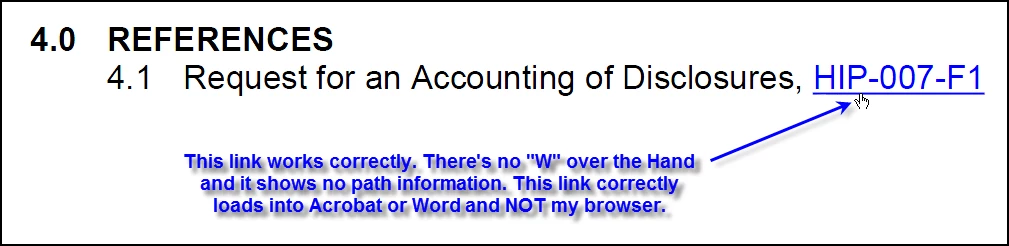
Links in newly created PDFs from Word now try to open in my browser instead of their native program. That is, if I have a link to a PDF or Word document in a Word document and PDF it using the Acrobat tab and selecting "Create PDF", when I click on a link in the newly created PDF, it tries to open it in my browser and not Acrobat or Word and when I hover the Hand cursor over the link (see Screenshot #1 below), it now shows a "W" in the hand, which means "Open a web link", whereas links in documents that I created previously the same way have no "W" over the hand (see Screenshot #2 below) when I hold my cursor over a link in a PDF and they open into the correct program (Acrobat or Word) when I click on them.
Screenshot #1:

Screenshot #2:
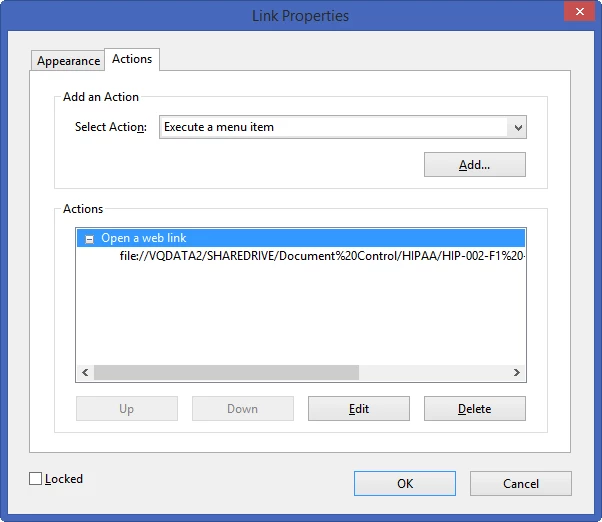
Somehow, PDFMaker (used from inside Word 2013) is now coding the resulting links in the PDFs as "Open a web link" (see Screenshot #3 below) instead of "Open a file":
Screenshot #3:
The files that used to be created (prior to 06/29/2016) have the Link Properties as "Open a file" (see Screenshot #4 below):
Screenshot #4:
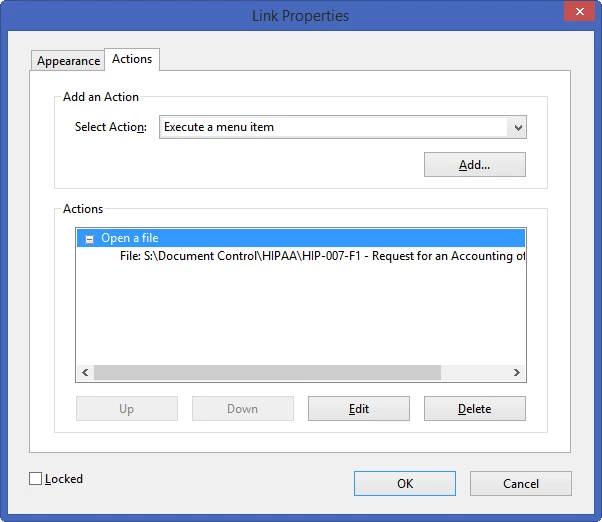
The last document that I created that has the links working correctly as "Open a file" was on 06/28/2016. The next one that I created on 07/05/2016 (and in all subsequent documents) do NOT have links that work correctly.
Thank you for any help in fixing this issue.
PS: The links always work correctly when I click on them from inside the original Word 2013 document. They just don't work after I've PDF'd them and click on them from inside the PDF.
 AdChoices