


Known Participant
February 10, 2017
Answered

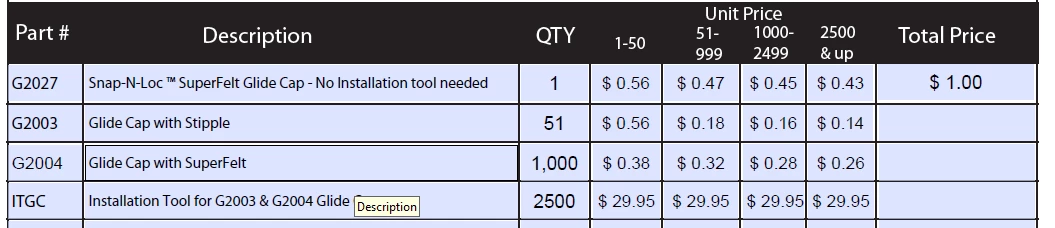
Please help with (the script). Necessary to multiply the two cells. The first is the QTY (set by hand). The second cell is given a choice between four ranges.

  • February 10, 2017
  • 1 reply
  • 735 views

Please help with (the script). Necessary to multiply the two cells. The first is the QTY (set by hand). The second cell is given a choice between four ranges (1 - 1 to 50; 2 - 51 999 3 - 1000 to 2499 4 - 2500 & up). The table looks like this: QTY Choice1 Choice2 Choice3 Choice4 Total Price!

This topic has been closed for replies.
Correct answer try67

OK, that's what I thought, but your example did not show the same results, which was confusing. Also your field names don't seem very consistent. I suggest you rename them to something like Qty1, UP1_1, UP1_2, UP1_3, UP1_3 and Total1.

Let's say that's the case. Then you can use this custom calculation script for Total1:

var qty = Number(this.getField("Qty1").value);

var unitPrice = 0;

if (qty>=1 && qty<=50) unitPrice = Number(this.getField("UP1_1").value);

else if (qty>=51 && qty<=999) unitPrice = Number(this.getField("UP1_2").value);

else if (qty>=1000 && qty<=2499) unitPrice = Number(this.getField("UP1_3").value);

else if (qty>=2500) unitPrice = Number(this.getField("UP1_4").value);

event.value = qty*unitPrice;

1 reply

try67
Community Expert
Community Expert
February 10, 2017

You'll need to better explain how the total price should be calculated... It's not clear from the information you provided.

It seems that the quantity should be multiplied by the price that corresponds with it, but in your screenshot the result for first row is not $0.56, but $1.00... Why is that?

try67
Community Expert
Community Expert
February 10, 2017

It will also be helpful to know the names of the fields involved.