
Participating Frequently
May 26, 2020
Answered

Populate fields based on Drop Down List Selection

  • May 26, 2020
  • 3 replies
  • 3315 views

I'm trying to set up a form so that four text fields will populate with data from a previously user entered field (separate text in each text field) at the same time.


Below is a screenshot of the fields that I am looking to populate when "Sole-Trader" is selected from the "employment_type1" dropdown list:
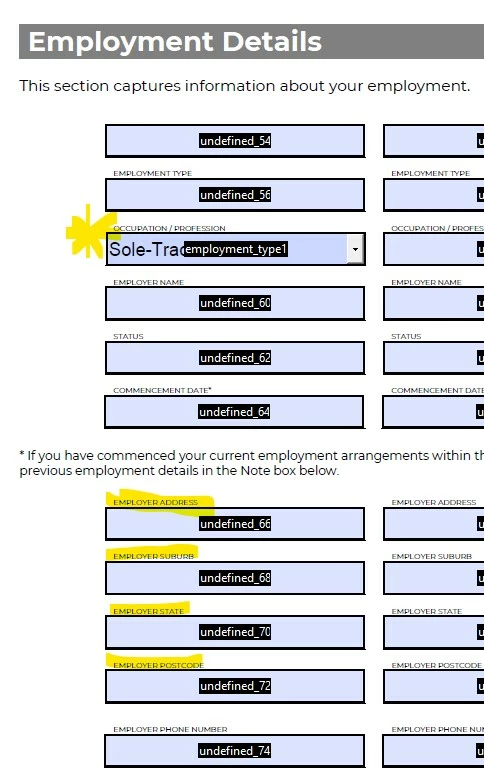
 

When the dropdown list is set to "Sole-Trader", the data for fields "undefined_68, 70, 72 & 74" is to come from the following fields, which have been completed earlier in the document.
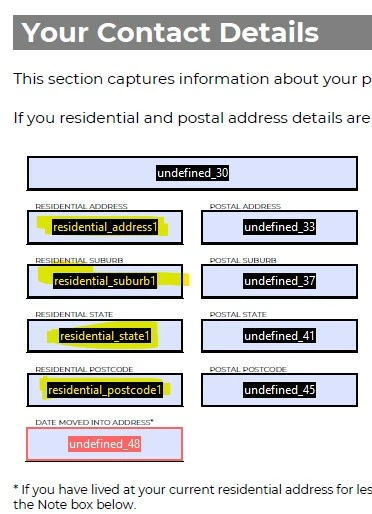
 

I have reviewed the existing threads and can find the following script, which I have attempted to modify, but to no avail:


var v1 = this.getField("employment_type1").valueAsString;

if (v1=="Sole-Trader") undefined_66 = ("residential_address_1");

else event.value = "";


Any guidance would be greatly appreciated.

This topic has been closed for replies.
Correct answer try67

You can use this code as the custom Validation script of the drop-down field:


if (event.value=="Sole Trader") {
	this.getField("undefined_66").value = this.getField("residential_address_1").value;
	this.getField("undefined_66").readonly = true;
} else {
	this.getField("undefined_66").readonly = false;
}


Make sure to tick the option to commit the selected value immediately, under the field's Properties, Options tab.

3 replies

Participant
August 20, 2020

I am trying to build a form that will populate an address in a text feild when one of the 11 companies is selected from a dropdown list.  How do I do this?  Once the company is selected from the dropdown list, I want the address attached to that specific company to auto populate on the form.

try67
Community Expert
Community Expert
August 20, 2020

The code I posted above can do that, if adjusted to include the actual values in your file.


Or you can use this (paid-for) tool I've developed that allows you to set it up easily and quickly, without having to write any code: http://try67.blogspot.com/2015/07/acrobat-populate-fields-from-dropdown.html

try67
Community Expert
Community Expert
May 26, 2020

The main question is, do you want those fields to be editable by the user, when another option is selected in the drop-down?
If so, using their Calculation code is not a good idea. I would use the Validation event of the drop-down to copy the values, but that would mean that if they change the fields you're copying from after "Sole Trader" has been selected the values won't update in the second set of fields.

ray_greyAuthor
Participating Frequently
May 26, 2020

Hi Try67, 


Thanks for the response and yes, if the user initially selects "Sole-Trader" from the dropdown menu, I would like the "undefined_66" field to be automatically populated with the previously entered data in the "residential_address_1" field. 


If however, the user changes their mind and replaces "Sole-Trader" with another option, e.g. "PAYG", they need to be able to manually enter the details of their employer's address in the "undefined_66, 68, 70, 72 & 74" fields.


Any suggestions on what this script would look like?


Love your work btw.

try67
Community Expert
try67Community ExpertCorrect answer
Community Expert
May 26, 2020

You can use this code as the custom Validation script of the drop-down field:


if (event.value=="Sole Trader") {
	this.getField("undefined_66").value = this.getField("residential_address_1").value;
	this.getField("undefined_66").readonly = true;
} else {
	this.getField("undefined_66").readonly = false;
}


Make sure to tick the option to commit the selected value immediately, under the field's Properties, Options tab.

Bernd Alheit
Community Expert
Community Expert
May 26, 2020

To transfer values of fields use this:

this.getField("undefined_66").value = this.getField("residential_address_1").value;
ray_greyAuthor
Participating Frequently
May 26, 2020

Thank you for your response and the script you have provided, which does populate the "undefined_66" field with the previously entered data, however it is not contingent upon "Sole-Trader" being selected from the dropdown menu, which is a requirement of my document.