


LordJay
Participant
November 30, 2017
Answered

Populating Prices from Dropdown Box

  • November 30, 2017
  • 1 reply
  • 1070 views

Hi,

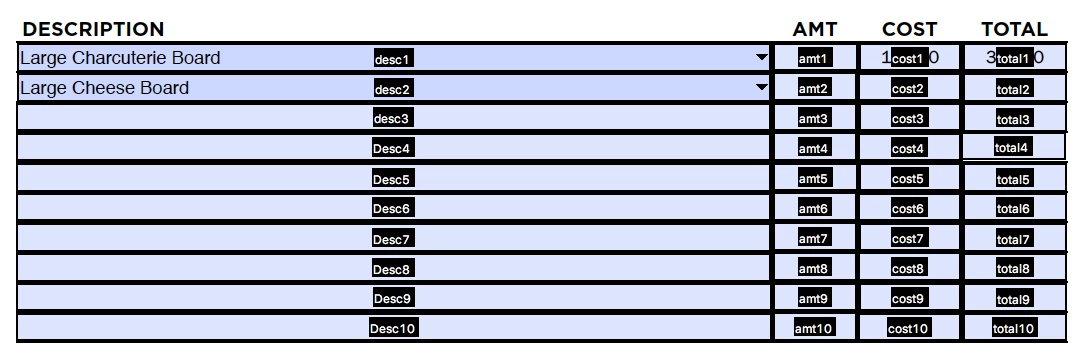
I have been trying to write a script that automatically populates a price in another field once an item in a dropdown box is selected. From looking at the tutorials, I have a good portion completed but I am running into the issue where every "cost" field is populated and I am not sure how to create a 1:1 selection with each row.

Example: desc1 populates for cost1

                desc2 populates for cost2

Code:

var cateringData = { "Large Cheese Board":{ cost: "165"},

                                 "Regular Cheese Board":{cost: "98"}};

function setFieldValues(cCateringName)

{

  this.getField("cost1").value = cateringData [cCateringName].cost;

  this.getField("cost2").value = cateringData [cCateringName].cost;

  this.getField("cost3").value = cateringData [cCateringName].cost;

  this.getField("cost4").value = cateringData [cCateringName].cost;

  this.getField("cost5").value = cateringData [cCateringName].cost;

  this.getField("cost6").value = cateringData [cCateringName].cost;

  this.getField("cost7").value = cateringData [cCateringName].cost;

  this.getField("cost8").value = cateringData [cCateringName].cost;

  this.getField("cost9").value = cateringData [cCateringName].cost;

  this.getField("cost10").value = cateringData [cCateringName].cost; }

Then this code is in the dropdown box field (desc1),

if( event.willCommit ) {

    if(event.value == "") this.resetForm(["cost1"]); else setFieldValues(event.value); }
Any help is much appreciated!

Thanks!

This topic has been closed for replies.
Correct answer Thom Parker

So you have one dropdown for each cost field? Then all you need is a simple way to specify the associated cost field, when a particular dropdown is selected.

Modify your script so the name of the associated field is passed into the function that modifies the field value

function setFieldValues(cCateringName, cCostFieldName)

{

  this.getField(cCostFieldName).value = cateringData [cCateringName].cost;

}

The dropdown code for the desc1 field includes the name of the field it will affect:

if( event.willCommit ) {

    if(event.value == "") this.resetForm(["cost1"]); else setFieldValues(event.value,"cost1"); }

I personally prefer self-aligning systems, where the target fields are derived from the name of the current field. For this you'd add code to the Dropdown keystroke code:

var cCostName = event.targetName.replace(/desc/,"cost");

This code automatically generates the name of the associated field.

1 reply

Thom Parker
Community Expert
Thom ParkerCommunity ExpertCorrect answer
Community Expert
November 30, 2017

So you have one dropdown for each cost field? Then all you need is a simple way to specify the associated cost field, when a particular dropdown is selected.

Modify your script so the name of the associated field is passed into the function that modifies the field value

function setFieldValues(cCateringName, cCostFieldName)

{

  this.getField(cCostFieldName).value = cateringData [cCateringName].cost;

}

The dropdown code for the desc1 field includes the name of the field it will affect:

if( event.willCommit ) {

    if(event.value == "") this.resetForm(["cost1"]); else setFieldValues(event.value,"cost1"); }

I personally prefer self-aligning systems, where the target fields are derived from the name of the current field. For this you'd add code to the Dropdown keystroke code:

var cCostName = event.targetName.replace(/desc/,"cost");

This code automatically generates the name of the associated field.

Thom Parker - Software Developer at PDFScriptingUse the Acrobat JavaScript Reference early and often
LordJay
LordJayAuthor
Participant
December 1, 2017

Awesome! Thank you so much for helping me.