


juliusc67934969
Participating Frequently
Nov 10, 2020 12:53 PM UTC
Answered

populating textfield based on the drop list selection.

Hello my Friends,


I need your help for this problem and I need the code for this issue.


Here the details for this form.


In the the Status Dropbox there 3 categories ( Pending, Invoice and Release)


When I select the “Pending”  Status in  dropbox, then select the Reservation date and select the Deposit Dropbox (yes or No) then result in Over due text box

if “yes” selection from deposit dropbox  = display in overdue textbox is “14 days"

If  “no” selection from deposit dropbox = display in overdue textbox is “ 3 days”  
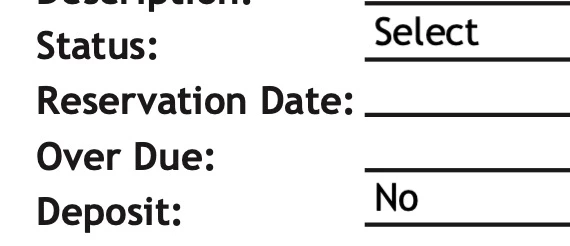
If the status select, invoice and release not showing the overdue. Mean blank only. Only the Pending showing the output in over due textbox.


Please refer the sample in excel in attached. So that you have idea what I mean.   The main point there is if you change the date automatic the over due is change the no. of days.


Also, the pdf file sample but without code in over due because I don’t know how to do it.


Thanks you advance for you help.

This topic is closed to new replies. Start a new post to keep the conversation going.
Nesa Nurani
Nesa NuraniCorrect answer
Community Expert
Nov 11, 2020 12:37 PM UTC

also, if  I want to change the date example below.


10/10/2020  - the result in over due is  -8 days

12/20/2020 - the result in over due is 53 days.


you can see there the sample in excel.


See if this works for you example 

This is code I put in "OD1" field as custom calculation script:

var today = util.printd("mmmm/d/yyyy", new Date());
var overdue = this.getField("Date1A_af_date").value;
if (today.length && overdue.length) {
var datetoday = util.scand("mmmm d, yyyy", today);
var dateoverdue = util.scand("mmmm d, yyyy", overdue);
var diff = (dateoverdue.valueOf() - datetoday.valueOf())/1000;
var days = (((diff / 60) / 60) / 24);
var res = days+14;
var res2 = days+3;}
if(this.getField("Status1").valueAsString == "Pending" && this.getField("Dep1").valueAsString == "Yes"){
event.value = res.toFixed();}
else if(this.getField("Status1").valueAsString == "Pending" && this.getField("Dep1").valueAsString == "No"){
event.value = res2.toFixed();}
else event.value = "";


13 replies

Nesa Nurani
Community Expert
Community Expert
Nov 11, 2020 6:10 AM UTC

Put the code in "OD1" field as "Custom Calculation Script"

if(this.getField("Status1").valueAsString == "Pending" && this.getField("Dep1").valueAsString == "Yes"){
event.value = "14 Days";}
else if(this.getField("Status1").valueAsString == "Pending" && this.getField("Dep1").valueAsString == "No"){
event.value = "3 Days";}
else event.value = "";

Translate
juliusc67934969
Participating Frequently
Nov 11, 2020 6:36 AM UTC

finally. thanks you Nesa. 🙂 

Translate
Inspiring
Nov 10, 2020 3:59 PM UTC

How exactly do you want second part of your question if date is changed to work?

If it's todays date it shows "14 days" and lets say its November 14 2020 what does it need to show then?

Translate
juliusc67934969
Participating Frequently
Nov 11, 2020 6:00 AM UTC

Hi Asim,


Anyway forget the second question.  Sorry for that.


I need only the code for that 1st part. Please can you help me this.

Translate
Bernd Alheit
Community Expert
Community Expert
Nov 10, 2020 2:16 PM UTC

You can find scripts for this in the forum.

Translate
juliusc67934969
Participating Frequently
Nov 10, 2020 2:22 PM UTC

Hi Bernd, please can you find me. because i try to find this same question but unfortunely I did see the script what I'm looking for. 


Translate
Bernd Alheit
Community Expert
Community Expert
Nov 10, 2020 2:32 PM UTC

Look also at "Related conversations".

Translate