Participant
October 24, 2016
Answered

Print only sticky notes on a single page

  • October 24, 2016
  • 1 reply
  • 1522 views

I have Adobe 11 (pro).

I would like to print the sticky notes of a pdf on a single page.

How can I do that?

NB: The comments options allow me to print sticky notes only on separate pages, which isn't what I want.

Also, some javascripts allow one to create a list of all comments, including both highlighted text and sticky notes. I only want the sticky notes.
This topic has been closed for replies.
Correct answer Document Geek

Do you only want the sticky notes? What about the actual content of the page?

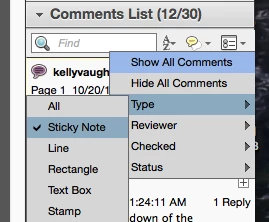
First, filter comments by type.

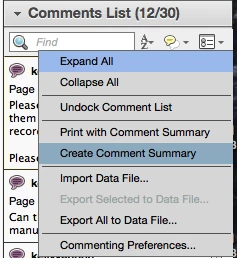
Then in the flight menu of the Comments pane: choose Create Comment Summary

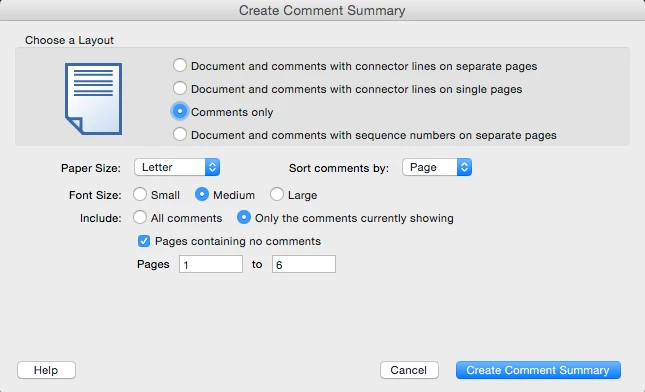
Then you may need to fiddle around with the settings here to get it to appear the way you want. There doesn't appear to be a built-in way to make all the comments appear on a single page. But if you really need them to be on one page, you can copy and paste all the content onto one page.

1 reply

Document Geek
Community Expert
Document GeekCommunity ExpertCorrect answer
Community Expert
October 25, 2016

Do you only want the sticky notes? What about the actual content of the page?

First, filter comments by type.

Then in the flight menu of the Comments pane: choose Create Comment Summary

Then you may need to fiddle around with the settings here to get it to appear the way you want. There doesn't appear to be a built-in way to make all the comments appear on a single page. But if you really need them to be on one page, you can copy and paste all the content onto one page.

Participant
December 17, 2022

Brilliant!  Thanks for this solution!