


Participant
June 22, 2016
Answered

Print specific tile

  • June 22, 2016
  • 1 reply
  • 4557 views

Is there a way to print specific tiles (NOT specific pages) when using the poster option?

I am working on a large display map that will consist of 3 individual panels, 76" long and 36" wide (our plotter size).  I would like to print just the top portion of each tile for testing, to see how the borders, etc align.

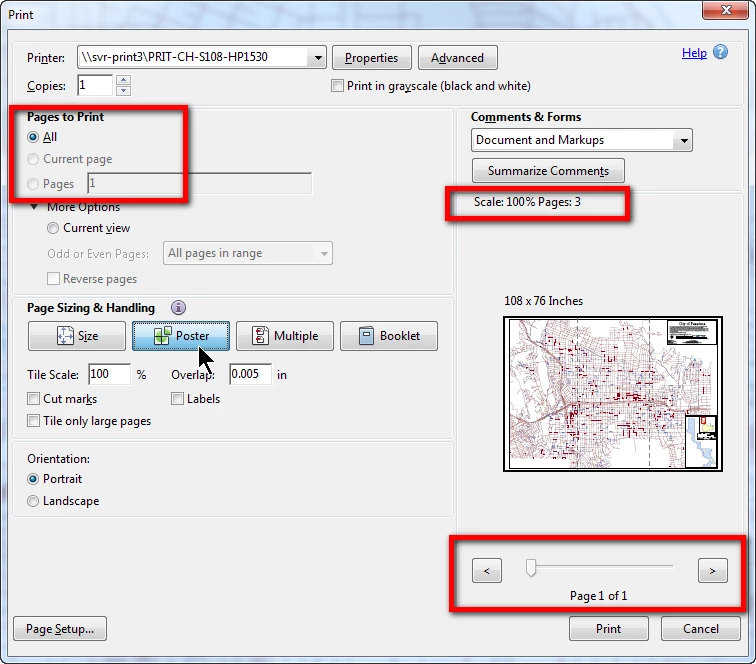
I would prefer not to print the entire length of each tile for this purpose. However, when set to "Poster", while the scaling note indicates it knows there are 3 pages (i.e. tiles), the print selections only see the entire document (see image below). 
Any suggestions would be appreciated!

klf

This topic has been closed for replies.
Correct answer try67

Print it to the Adobe PDF printer. It will generate a new PDF file where each page is a single tile. Then you'll be able to print just the tile you want.

1 reply

try67
Community Expert
try67Community ExpertCorrect answer
Community Expert
June 26, 2016

Print it to the Adobe PDF printer. It will generate a new PDF file where each page is a single tile. Then you'll be able to print just the tile you want.

klf123Author
Participant
July 13, 2016

Thank you!  This did the trick and allowed me to test the individual panels.  Thank you for the prompt reply (as opposed to my acknowledgement; apologies, vacation intervened)

Thanks again!

klf