
May 29, 2016
Answered

Prompted to Save After Every File Being Processed via Action Wizard

  • May 29, 2016
  • 1 reply
  • 1038 views

I have created an Action Wizard to change spot colors to CMYK. The Wizard includes the preflight and save steps. However, it still asks me if I want to save after it processes every file before moving on to the next. Any advice on how to get that prompt to stop would be much appreciated!
This topic has been closed for replies.
Correct answer Adorobat

Hi katec71671638​,

Please follow these steps to fix the issue .

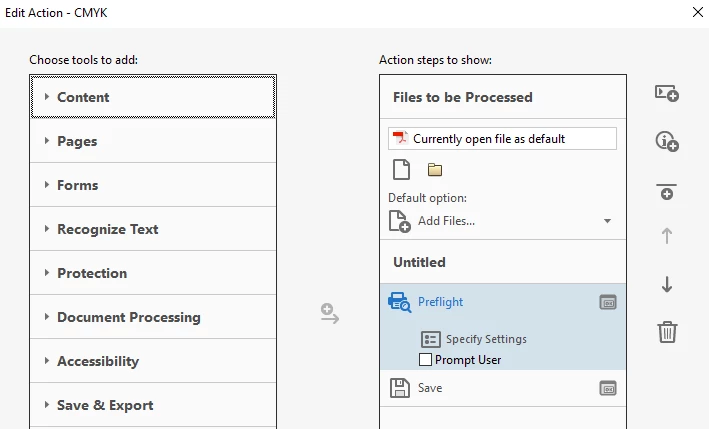
1 -Go to Tools and then type "Manage Action" ,Then find the action you created and select that action and click Edit>Under Preflight ,uncheck "Prompt user" and click save, close the Edit Action tab.

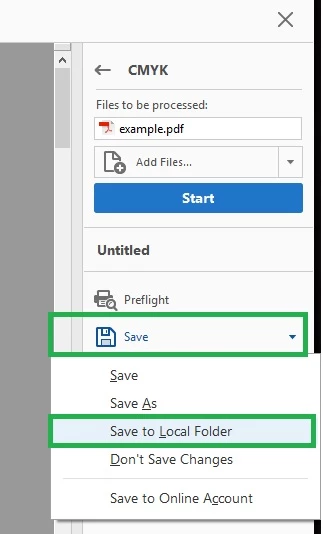
2-In the right pane ,under the action ,Click on save , choose "Save to Local Folder", select the location and click ok.

   Then run the action .

Thanks!

Shivam

1 reply

Adorobat
AdorobatCorrect answer
Participating Frequently
May 31, 2016

Hi katec71671638​,

Please follow these steps to fix the issue .

1 -Go to Tools and then type "Manage Action" ,Then find the action you created and select that action and click Edit>Under Preflight ,uncheck "Prompt user" and click save, close the Edit Action tab.

2-In the right pane ,under the action ,Click on save , choose "Save to Local Folder", select the location and click ok.

   Then run the action .

Thanks!

Shivam