



Query regarding creating an object or list from fields on page...
Hi there,
I've been reading through an example in the Acrobat JS Scripting Reference regarding dialog creation.
Having worked forward from some code in the reference I've managed to generate the following dialog:
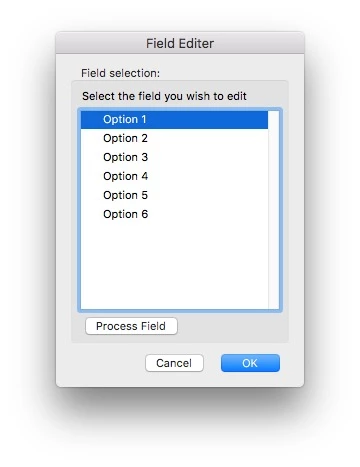
I've been able to manipulate the example to list more 'options' in the text field and change some of the buttons etc. All works fine.
What I'm working towards is listing all the form fields, on a page, as the options in the list in the dialog above.
I've found a great function for creating a list of fields, on a given page, which works perfectly. It's really useful.
function getPageFields(doc, p) {
var fields = [];
for (var i=0; i<doc.numFields; i++) {
var f = doc.getField(doc.getNthFieldName(i));
if ((typeof f.page=="number" && f.page==p) || (typeof f.page!="number" && f.page.indexOf(p)>-1)) fields.push(f.name);
}
return fields;
}
getPageFields(this, 0);
Here's where my knowledge is limited. What I'd like to do is create an object (or list, here I'm not sure) from the 'fields list' so I can load it into part of the dialog creation as shown below:
loadDefaults: function (dialog) {
dialog.load({
subl:
{
"Option 1": +1,
"Option 2": -2,
"Option 3": -3,
"Option 4": -4,
"Option 5": -5,
"Option 6": -6,
}
})
}
I've been trying to use this article (https://acrobatusers.com/forum/javascript/dialog-load-list-box-default-value/), and information from the Scripting Ref, to try and achieve this. As yet I've not succeeded.
Please can someone help me.
Thank you.

 AdChoices