
Question 1: How to add or use jQuery in Folder Level Adobe Javascript. Question 2: How to write normal Javascript in Folder Level Adobe Javascript ie., getElementbyid etc... Please find the code below which shows what I am referring to
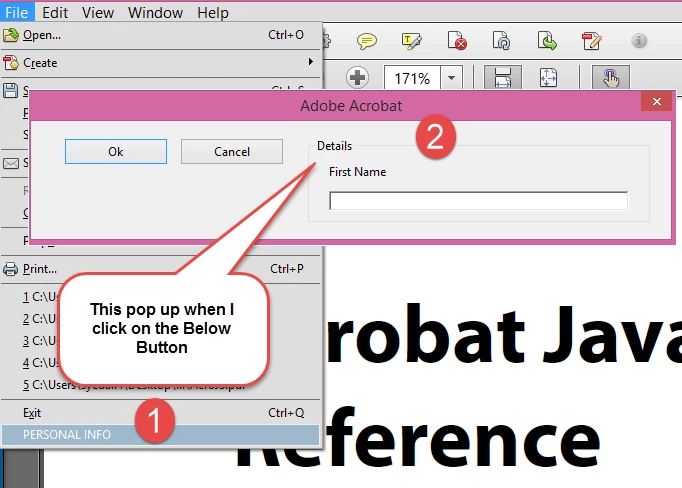
Below is my Folder Level Javascript which comes as a Pop up when I click on a Custom created button in a PDF reader..
I created a Test.js file and then pasted the below code in it. Then I copy pasted that file in the following path: C:\Program Files (x86)\Adobe\Acrobat 11.0\Acrobat\JavaScripts
Now I want to know how to add either jQuery Code or the Normal Javascript in the below code. Please give an example.
Note: I am not using the Javascript Forms here. This is a folder ACROJS Javascript.
// Start of Code
app.addMenuItem({ cName: "PERSONAL INFO", cParent: "File", cExec: "helloWorld()" });
var helloWorld = app.trustedFunction(function () {
app.beginPriv();
var dialog1 = {
description:
{
elements:
[
{
type: "cluster",
name: "Details",
align_children: "align_left",
elements:
[
{
type: "static_text",
name: "First Name"
},
{
type: "edit_text",
alignment: "align_fill",
width: 300,
height: 20
}
]
},
{
alignment: "align_left",
type: "ok_cancel",
ok_name: "Ok",
cancel_name: "Cancel"
}
]
}
};
app.execDialog(dialog1);
app.endPriv();
});
//End of Code


 AdChoices