


aprild49548367
Known Participant
April 5, 2018
Answered

Radio button issues

  • April 5, 2018
  • 2 replies
  • 2567 views

Below are this the question from my form. I have a radio button Yes/No set (named HMDA) and I want to force the applicant to answer the question without being able to skip over it.  I wrote the below code but it doesn't work properly.  If the applicant tries to skip the question an alert will appear letting them know they have to answer the question.  When they click ok to dismiss the alert - if they answer yes to the question my script works fine and they can move on to the next question on the form.  However, when they click ok to dismiss the alert - if they try to answer No to the question the alert appears again and they click ok to dismiss the alert then the No button will populate and then applicant can move on.

Script for my Question:

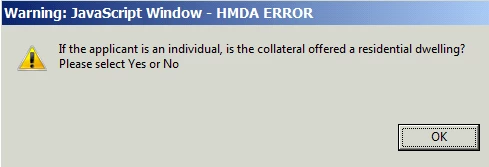
if(getField("HMDA").value=="Off")app.alert("If the applicant is an individual, is the collateral offered a residential dwelling? Please select Yes or No",1,0,"HMDA ERROR")

Also, how do I get rid of the Warning: "JavaScript Window" on my alert?
This topic has been closed for replies.
Correct answer Thom Parker

The error message is an Adobe's anti-spoofing mechanism.  In order to get rid of it the code has to be run from a privileged (trusted) location,i.e. not a document script.

You can read more about trust and privilege here:

Trust and Privilege in Acrobat Scripts

2 replies

Legend
April 6, 2018

Yes, but "tab through a question" doesn't mean anything when the user can just click past it. You need to move from the concept to exactly what you want to happen, realising that PDF forms haven't been designed to enable this easily. You have to forbid actions in all successor fields after checking conditions. Consider too that fields have more than one action type, choose carefully.

Thom Parker
Community Expert
Thom ParkerCommunity ExpertCorrect answer
Community Expert
April 6, 2018

The error message is an Adobe's anti-spoofing mechanism.  In order to get rid of it the code has to be run from a privileged (trusted) location,i.e. not a document script.

You can read more about trust and privilege here:

Trust and Privilege in Acrobat Scripts

Thom Parker - Software Developer at PDFScriptingUse the Acrobat JavaScript Reference early and often
aprild49548367
Known Participant
April 6, 2018

Thank you.  That fixed one of the problems.

Bernd Alheit
Community Expert
Community Expert
April 6, 2018

Where did you add the code?
