



KazuT
Inspiring
September 12, 2016
Answered

recognize text without losing quality

  • September 12, 2016
  • 1 reply
  • 1372 views

In Acrobat DC 2015.17.20053, I created a PDF from a .PNG (resolution 131.6 dpi). It created a clean-looking .PDF (here it is at 150%):
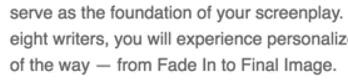
But when I use OCR Text Recognition, it degrades the quality and creates a lot of artifacts:
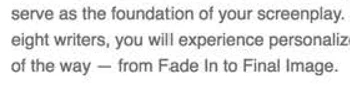
Is there a way to use Text Recognition and maintain decent quality?
This topic has been closed for replies.
Correct answer KazuT

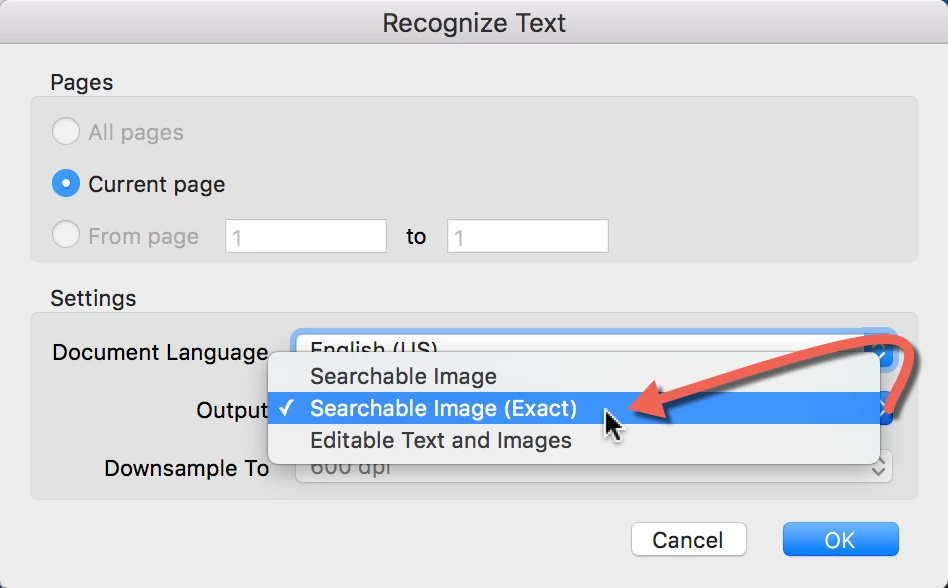
It seems that, in order to maintain high quality, I have to choose "Output / Searchable Image (Exact)". The file size stays enormous; but the text doesn't get dirty (too compressed).

1 reply

Legend
September 12, 2016

Which OCR options did you use?

KazuT
KazuTAuthorCorrect answer
Inspiring
December 19, 2016

It seems that, in order to maintain high quality, I have to choose "Output / Searchable Image (Exact)". The file size stays enormous; but the text doesn't get dirty (too compressed).