Participant
Mar 10, 2023 6:24 PM UTC
Question

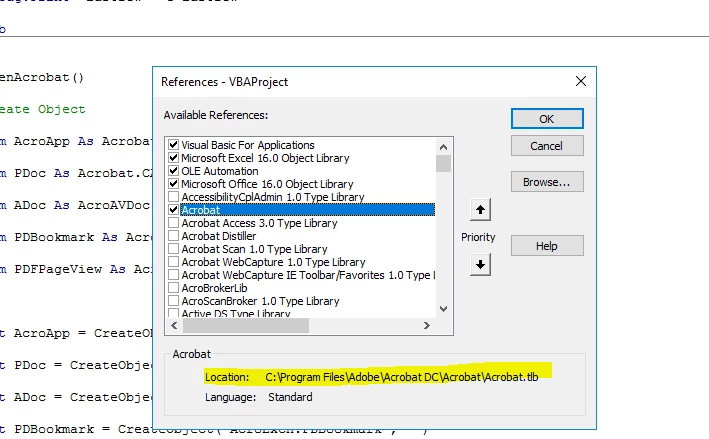
References - VBAProject

Hi,


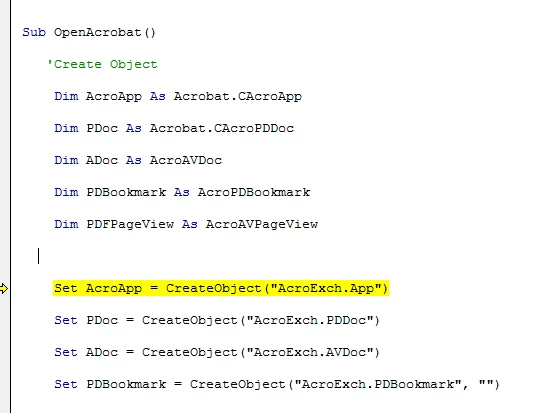
I have both Adobe DC and Acrobat 2020 installed on my laptop. When I reference a VBAProject in an excel sheet, it always link to Adobe DC but not Acrobat 2020, seems like by default. Adobe DC is under C:\Program Files while Acrobat 2020 is under C:\Program Files (x86)\Adobe\Acrobat 2020. Is this the way it should be? or is there anything I can do to make it link to Acrobat 2020? Aparently, it reads the below codes well before reading the highlighted one. I got a Run-time error '429' ActiveX component can't create object when I run the highlighted code.

Any help will be greatly appreciated!


Thanks,

Simon 


This topic is closed to new replies. Start a new post to keep the conversation going.

4 replies

Legend
Mar 11, 2023 8:59 AM UTC

Adobe have moved to block havng both Acrobat and Reader on the same computer. Expect pain if you've managed to trick it into this... get rid of Reader. Yes, you may indeed need a separate system for testing.

Translate
Participant
Mar 11, 2023 1:05 PM UTC

Thanks for your reply and suggestions, appreciated!

Translate
Bernd Alheit
Community Expert
Community Expert
Mar 11, 2023 6:26 AM UTC

What is "Adobe DC"? Acrobat Reader or Adobe Acrobat?

Translate
Participant
Mar 11, 2023 12:41 PM UTC

It is Adobe Acrobat Reader

Translate