
Remove Form field numbers after multiple pages are added to pdf
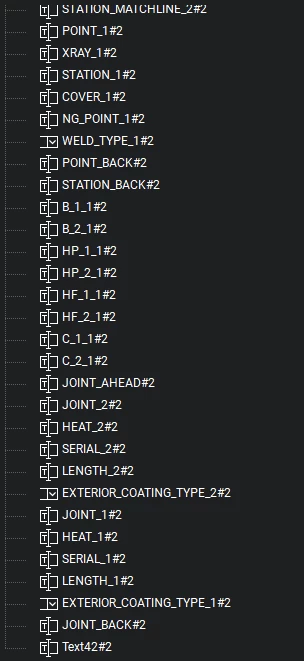
I need to remove the #number on forms after pages are added for scripts. All pages after the first are identical ordering but scripts will not work after first page.
Page 1
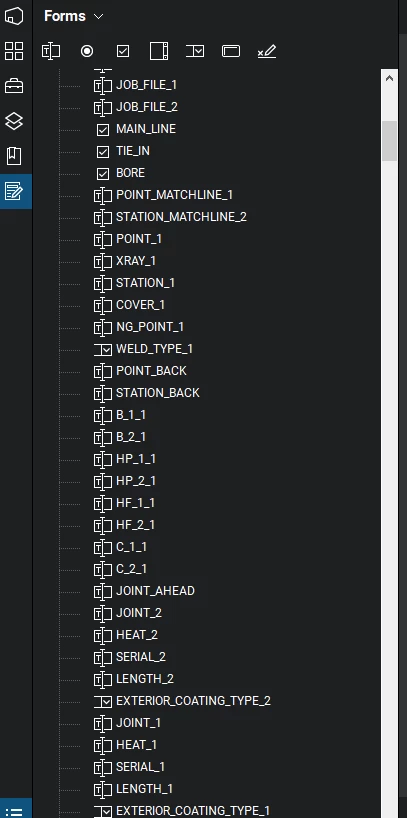
Page 2
EXAMPLE SCRIPT
GLOBAL
// initialize the auto-populate data to an empty object.
var oContactData_Ex7 = {};
// Read contents of file attachment into a string
// Assume there is only one file attachment
var stmCSVFile = this.getDataObjectContents(this.dataObjects[0].name);
var strCSVFile = util.stringFromStream(stmCSVFile);
// Parse data into object
// First Split into lines
var aLines = strCSVFile.split(/[\r\n]{1,2}/);
// Grab column names
var aColNames = aLines.shift().split(",");
// loop over lines and fill object
for(var i=0;i<aLines.length;i++)
{// only operate on non-empty lines
if(!/^\s*$/.test(aLines))
{ // split out data items on line
var aEntries = aLines.split(",");
oContactData_Ex7[aEntries[0]] = {};
for(var n=1;n<aEntries.length;n++)
oContactData_Ex7[aEntries[0]][aColNames
}
}
// Build array of selection item names from the data object
var aNames = [" - "];
for(var cName in oContactData_Ex7)
aNames.push(cName);
//Add blank entry to data
oContactData_Ex7[" - "] = {mailStop:"", email:"", department:"", phone:""};
// Get the drop down field
var oDropFld = this.getField("Ex7.ContactDropDown");
// Save previous selection value
var bBlockEx7 = true;
var oldValue = oDropFld.value;
// Fill drop down with names
oDropFld.setItems(aNames);
// Restore previous selection value
if(oldValue && /^\S+$/.test(oldValue))
oDropFld.value = oldValue;
bBlockEx7 = false;
CUSTOM KEYSTROKE
if(event.willCommit && !bBlockEx7)
{
var oEntry = oContactData_Ex7[event.value];
if(oEntry)
{// If entry exists fill in the fields
// Loop through the names of each entry
// Each entry name must match a field name on the form
for(var cName in oEntry)
{
var oFld = this.getField("Ex7." + cName);
if(oFld)
oFld.value = oEntry[cName];
}
}
else
{
// Place code for custom entry here.
}
}



 AdChoices