
Participant
June 28, 2016
Question

Remove Search Index

  • June 28, 2016
  • 3 replies
  • 702 views

I have large collections of PDF files that have attached indexes,

meaning if I go to "Document Properties/Advanced" the box "Search Index" is filled in.

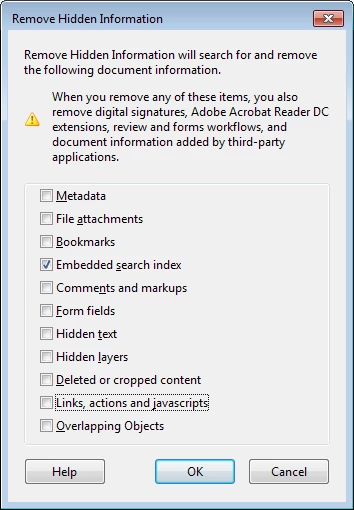
I would like to remove these and it seems there is an action in Action Wizard called

"Remove Hidden Information" that has as one of its options "Embedded seach index"

Only problem is that it doesnt do anything

I have tried it Acrobat X, XI and DC

Am I using the wrong action, or is this a bug?
This topic has been closed for replies.

3 replies

JR Boulay
Community Expert
Community Expert
June 30, 2016

Hi.

Am I using the wrong action, or is this a bug?

You are using the wrong action: an Embedded search index is not the same thing than a Catalog index.

Attached in the doc. properties is a Catalog index, not an Embedded index.

I don't know if it's possible to batch delete into the doc. properties…

Acrobate du PDF, InDesigner et Photoshopographe
Participant
June 30, 2016

Yes that's exactly what they have (as I mentioned in my question).

So I can easily get rid of it in a particular files using that dialog.

My problem is that I have literally thousands of files, so I'm looking for a way to automate it.

CtDave
Participating Frequently
June 29, 2016

Perhaps one or more of the PDF files have a Catalog Index (PDX) 'mounted'.

Using Acrobat Pro (not Reader) check the Document Properties of the PDF(s).

Be well...