
Participant
May 18, 2020
Answered

Remove specific repeated top level bookmarks

  • May 18, 2020
  • 1 reply
  • 1199 views

Hi there!

I'm looking into removing specific bookmarks (repeated) from a bulk invoice PDF which is generated by our e-commerce platform automatically (300 invoices in one PDF file). 
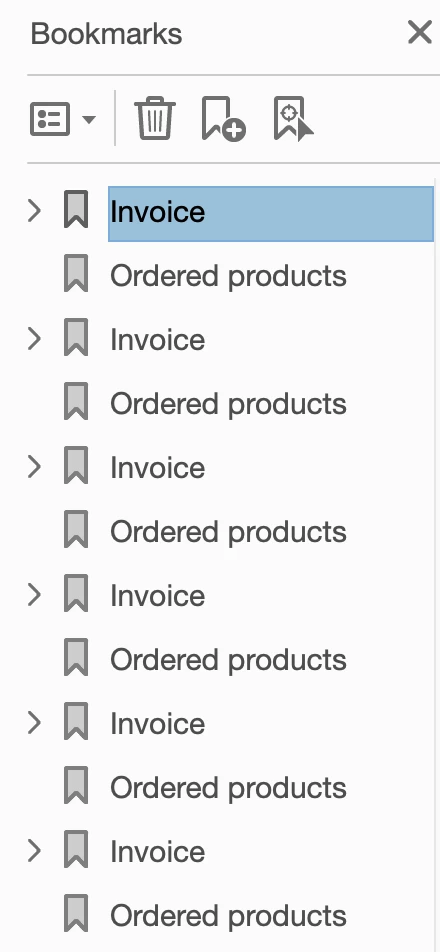


As you see there are two top level bookmarks in each invoice, I'm trying to figure how to remove all the "Ordered products" bookmarks with a script, so that I could use the Split function to split all 300 invoices by Top Level of Bookmarks.


I know: 

this.bookmarkRoot.remove(); would remove everything

and I have tried:

this.bookmarkRoot.remove("Ordered products"); which did not work


Anyone could please help me the novice here ? 🙂


Thank you so much in advance!

This topic has been closed for replies.
Correct answer try67

You can use this code to achieve it:


for (var i=this.bookmarkRoot.children.length-1; i>=0; i--) {
	var bkm = this.bookmarkRoot.children[i];
	if (bkm.name=="Ordered products") bkm.remove();
}

1 reply

try67
Community Expert
try67Community ExpertCorrect answer
Community Expert
May 18, 2020

You can use this code to achieve it:


for (var i=this.bookmarkRoot.children.length-1; i>=0; i--) {
	var bkm = this.bookmarkRoot.children[i];
	if (bkm.name=="Ordered products") bkm.remove();
}
EzzirahcAuthor
Participant
May 19, 2020

That's so cool, works perfectly! Thank you so much for helping out!