
Participant
March 29, 2016
Answered

Required Response Needed for Each Group of Checkboxes Before Form Submits

  • March 29, 2016
  • 5 replies
  • 931 views

Hi Everyone,

I've looked at multiple postings and none of them seem to give me exactly what I need, so now I'm posting for help please.

I have a form that contains 25 rows of questions with associated groups of checkboxes to answer by the recipients. I need to make it a requirement so that ONE of the checkboxes are marked for each of the questions before they can submit the form.

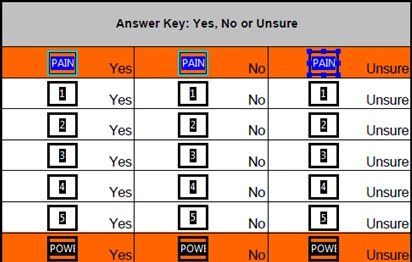
See my screen shot below:

For example, in the first orange row all 3 checkboxes are titled "PAIN" with export values of: "YES", "NO", and "UNSURE".

On the second row, all 3 checkboxes are titled, "1" with export values of: "YES", "NO", and "UNSURE".

Third row and on just keep going in the same manner. Each row share the same title and have the export values as mentioned above.

Is there a script I can use so that the recipients are required to select 1 checkbox from each group/row before they will be allowed to submit their form?

Also, if you can provide the script I would use (if that's the solution), please let me know where I would enter that script (i.e. - as a mouse up action item, or a document script, etc.). I'm still learning these steps and need instructions on them.

If it's needed, I'm using Adobe Acrobat 9 Pro

Thanks in advance for anyone that can help!!
This topic is closed to new replies. Start a new post to keep the conversation going.
Correct answer try67

The script is meant to replace your current Submit Form command.

To specify multiple recipients you can add them to the cTo parameter, delimited by semi-colons, like this:

} else this.mailDoc({cTo: "me@server.com;john@server.com;kelly@server.com"});

5 replies

try67
Community Expert
Community Expert
March 29, 2016

I answered pretty much exactly the same question yesterday: Multiple Checkboxes - AT LEAST one required

Participant
March 29, 2016

Hi try67

Thank you for reply and I see your thread and still have some questions please.

You suggested the following; however I don't know if I need to enter that script into each checkbox "mouse up" action, or where do I use this?

Also, each of the checkboxes also have a script mouse-up action to highlight a certain color when selected. (I don't know if that makes a difference or not when adding the below)

And I have my "SUBMIT" button setup so that it is email to 4 different people when clicked.

try67
Community Expert
try67Community ExpertCorrect answer
Community Expert
March 29, 2016

The script is meant to replace your current Submit Form command.

To specify multiple recipients you can add them to the cTo parameter, delimited by semi-colons, like this:

} else this.mailDoc({cTo: "me@server.com;john@server.com;kelly@server.com"});