
Participant
September 8, 2016
Question

right click menu missing in windows 10

  • September 8, 2016
  • 2 replies
  • 8504 views

Right click menu to convert to pdf is missing, yet there is still the spaces for the menu description and if blindly clicking on the blank area the functionality works.

Any idea how to restore the descriptive text?
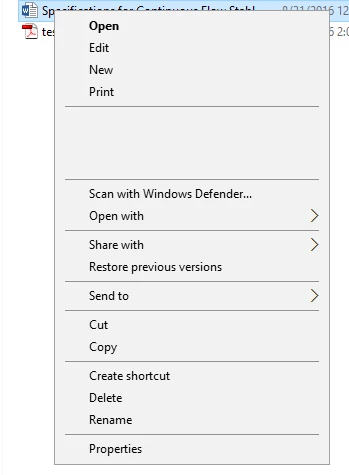
Windows 10 pro 64

Adobe Acrobat 9.0 Pro Extended

This topic has been closed for replies.

2 replies

Participant
October 3, 2020

I finally found a solution. All you need to do is uninstall the adobe acrobat and once completed, delete any file associated with the acrobat dc. search for hidden files and make them visible and go to your user data and search for any adobe acrobat associated files and delete them. finally, install your acrobat again

Participant
May 15, 2023

Try this:

  • First open the installation location of Adobe Acrobat PRO.
  • This differs per version x86 (32-bit) or x64 (64-bit).
    If you have chosen the default installation it can be in 2 different places.
    • 32-bit (x86)
  • "C:\Program Files\Adobe\Acrobat 10.0\Acrobat Elements\ContextMenu.dll"
    • 64-bit (x64)
  • "C:\Program Files (x86)\Adobe\Acrobat 10.0\Acrobat Elements\ContextMenu64.dll"


Then use regsvr32 to register the context menu DLL

  • regsvr32 "C:\Program Files (x86)\Adobe\Acrobat 10.0\Acrobat Elements\ContextMenu64.dll"


https://baswijdenes.com/fix-adobe-acrobat-pro-context-right-click-menu-missing/

try67
Community Expert
Community Expert
September 8, 2016

Acrobat 9 is not compatible with Windows 10.

Participant
September 8, 2016

I would agree to that, but it was working last week.

try67
Community Expert
Community Expert
September 8, 2016

Did you update Windows by any chance? Anyway, this is exactly the risk of running an application in an incompatible environment. It can stop working or have all kinds of strange problems without a clear reason.