


Inspiring
January 18, 2017
Answered

Script for choosing radio button based on value

  • January 18, 2017
  • 1 reply
  • 2385 views

Hi all,

I have no experience in creating scripts. I have two scripts that I actually need (I think).

The first script I would like/need is a on a field that sums up a series of totals for a grand total but I would like to have in brackets the percentage (as shown in the example below in red). The way it's laid out by the person who is wanting the form, is to have the grand total added up but I wanted to have that number than divided by the maximum score to get the percentage in brackets beside the total.

My second script (if it's doable) would be based on that percentage to automatically choose/check one of the radio buttons below based on the calculated percentage from the grand total line as calculated above.
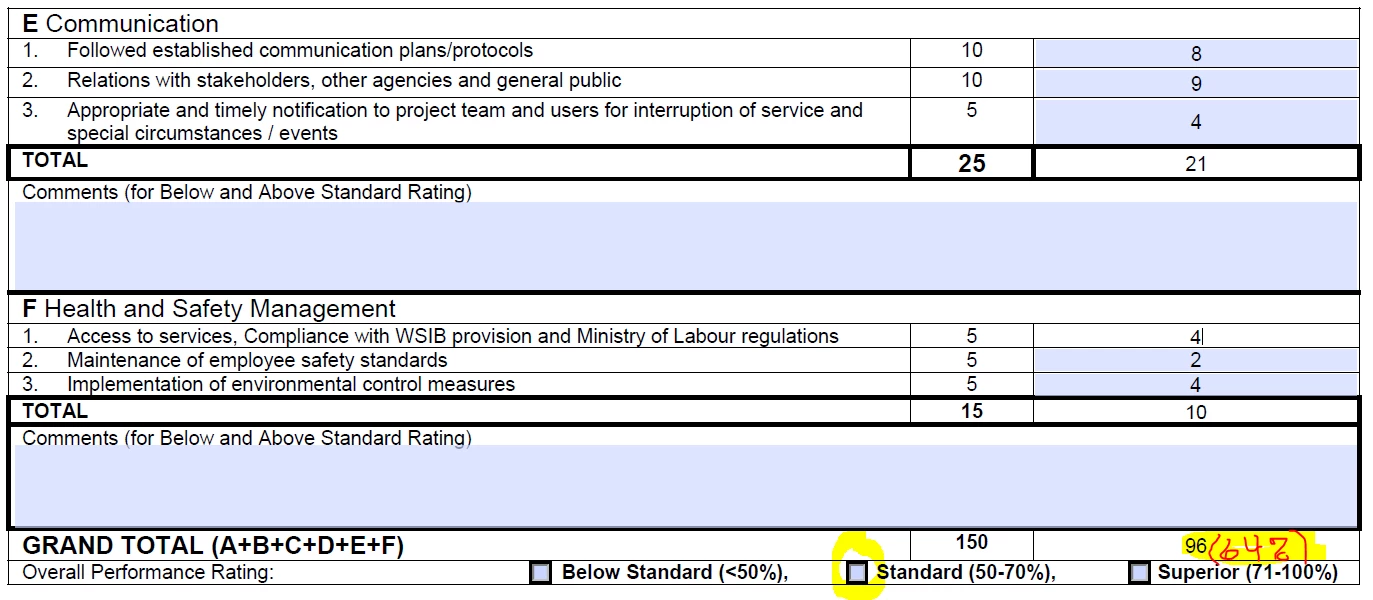
If this is not clear please don't hesitate to ask questions as I will try to better explain myself.

I am working in Adobe Acrobat Pro DC

Thanks in advance.

Paul

This topic has been closed for replies.
Correct answer try67

This script should be placed as the custom calculation script of the percentage field.

Instead of creating three separate fields I recommend you name them all the same (I used "OverallRating" in my code, but it could be something else), and give each one a unique value (it could be "1", "2", "3", like in my code, or it could be "Below Standard", "Standard" and "Superior"). The fields can be either check-boxes or radio-buttons, it doesn't matter.

1 reply

try67
Community Expert
Community Expert
January 18, 2017

I recommend you do the percentage value in a separate field. It will make things easier.

You could then combine both tasks into a single calculation script, like this:

var grandTotal = Number(this.getField("GrandTotal").value);

var gtPerc = grandTotal / 150;

if (gtPerc<0.5) this.getField("OverallRating").value = "1";

else if (gtPerc<=0.7) this.getField("OverallRating").value = "2";

else this.getField("OverallRating").value = "3";

event.value = "(" + (gtPerc*100).toFixed(2) + "%)";

Replace the field-names and check-box export values with the actual ones in your form, of course.

Edit: Fixed the last line of the code to match your desired format.

Inspiring
January 18, 2017

Thank you try67 for your quick response.

I will do the percentage in a separate field beside the Grand Total field.

But as I know little about scripting and related matters I have to ask where this script goes. I take it that the 'OverallRating' gets changed to the three radio button choices (Below Standard, Standard and Superior as I have labeled those three buttons that way? Like this?

  1. var grandTotal = Number(this.getField("GrandTotal").value); 
  2. var gtPerc = grandTotal / 150
  3. if (gtPerc<0.5) this.getField("Below Standard").value = "1"
  4. else if (gtPerc<=0.7) this.getField("Standard").value = "2"
  5. else this.getField("Superior").value = "3"
  6. event.value = "(" + (gtPerc*100).toFixed(2) + "%)"

Not sure what you mean by 'check-box export values' or where to put this script to have the radio buttons automatically selected based on the percentage calculated.

Thanks

Paul

try67
Community Expert
try67Community ExpertCorrect answer
Community Expert
January 18, 2017

This script should be placed as the custom calculation script of the percentage field.

Instead of creating three separate fields I recommend you name them all the same (I used "OverallRating" in my code, but it could be something else), and give each one a unique value (it could be "1", "2", "3", like in my code, or it could be "Below Standard", "Standard" and "Superior"). The fields can be either check-boxes or radio-buttons, it doesn't matter.