Participant
February 21, 2021
Question

Select a Radio Button from Tab Delimited File

  • February 21, 2021
  • 2 replies
  • 506 views

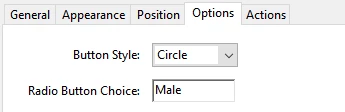
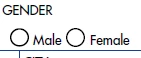
Hi I would like to select a radio button from my tab delimited file I am importing. I am creating the tab file from excel so I am wondering what I put into excel to select the radio button. The option in the button Male has the radio button choice male, so I tried 'male' and 'check' in the excel cell but I guess I must need something else?  I also have check boxes to select so tips on that are also welcome! Thanks
 

This topic has been closed for replies.

2 replies

try67
Community Expert
Community Expert
February 23, 2021

You need to use "Male", not "male". These values are case-sensitive.

To set the field as not selected use "Off".

Sales5DC5Author
Participant
February 21, 2021

As always when you type these questions you then try something that works lol apparantly it is "Yes"

try67
Community Expert
Community Expert
February 23, 2021

"Yes" is the default on-value, but if it's not the one you specified as the Radio Button Choice then it will not work.


Edit: fixed a wrong, yet important word... It will not work.