


Set value of text field based on selection of radio buttons
Refinement to earlier question try67
To simplify and modify an earlier question- assume the following
A document with two fields:
- question1 (a 2 button field)
- response1 (a multi line field)
I've added javascript as an "Action" for the "question1" field.
The javascript is as follows (triggered by mousedown)
var answer1 = this.getField("question1").value;
var responseText = "Response text not set (yet)";
console.println("Set Variable answer1 to :" + answer1);
if (answer1 == "yes") {
responseText = "The answer is yes"
console.println("We are setting the txt to yes");
}
else {
responseText = "The answer is no"
console.println("We are setting the txt to NO");
}
this.getField("response1").value = responseText;
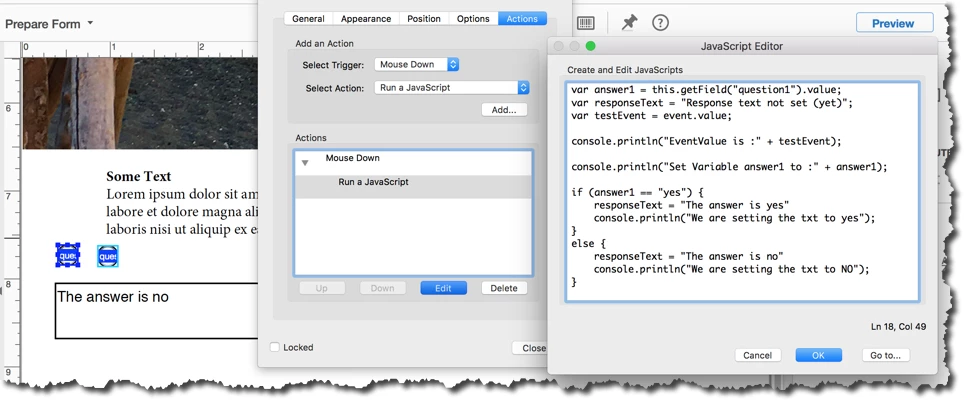
The problem is that when the event "mousedown" (or mouseup) fires, the value has not yet been set.
How do run my script AFTER the radio button has been set?
As it stands now, if the form is clear - the console log shows the following:
Set Variable answer1 to :Off
We are setting the txt to NO
Clearly, I'm either not putting the javascript in the right spot, or I'm not using the right event, or both... or so it seems.
Thank you in advance!
 AdChoices