
Participant
October 24, 2020
Answered

Simple Fillable Form Calculation- Division

  • October 24, 2020
  • 2 replies
  • 1369 views

Hi,

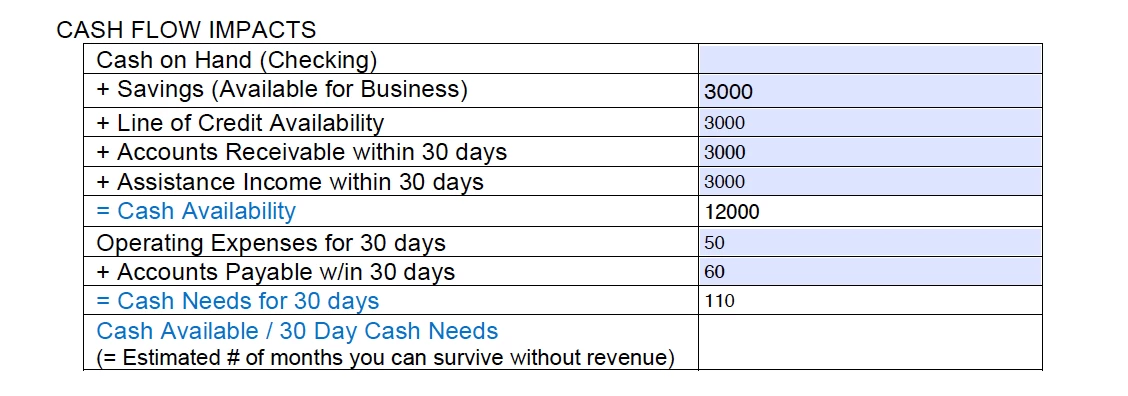
I need my fillable form to automatically divide two sub-totals.  What is the javascript code that I need to place in the last line to get these two subtotals (Cash Availability/CashNeedsFor30Days) to divide?  Thank you in advance!  
This topic has been closed for replies.
Correct answer try67

Use this code as the custom calculation script:


var v1 = Number(this.getField("Cash Availability").valueAsString);
var v2 = Number(this.getField("Cash Needs for 30 Days").valueAsString);
if (v2==0) event.value = "";
else event.value = v1/v2;

2 replies

Nesa Nurani
Community Expert
Community Expert
October 25, 2020

Write this in "Simplified Field Notation":  Cash\ Availability/CashNeedsFor30Days

Participant
October 25, 2020

Unfortunately, this one wouldn't work for me.  I don't understand why, but it wouldn't divide the fields.  The above custom calculation script did the trick though.  Thank you for reaching out - greatly appreciated!!

Nesa Nurani
Community Expert
Community Expert
October 25, 2020

Thats because I thought  your field name is "CashNeedsFor30Days" but it's "Cash Needs for 30 Days"

the code should be: Cash\ Availability/Cash\ Needs\ for\ 30\ Days

It's better not to use spaces in field names if using SFN.

try67
Community Expert
Community Expert
October 24, 2020

Divide by what? 2? What's the name of the field that contains the sub-total you want to divide?

Participant
October 24, 2020

Field Name "Cash Availability" divided by "Cash Needs for 30 Days".

try67
Community Expert
try67Community ExpertCorrect answer
Community Expert
October 25, 2020

Use this code as the custom calculation script:


var v1 = Number(this.getField("Cash Availability").valueAsString);
var v2 = Number(this.getField("Cash Needs for 30 Days").valueAsString);
if (v2==0) event.value = "";
else event.value = v1/v2;