


ryanm45904805
Participant
November 30, 2017
Answered

Single Button Show/Hide Fields

  • November 30, 2017
  • 1 reply
  • 1158 views

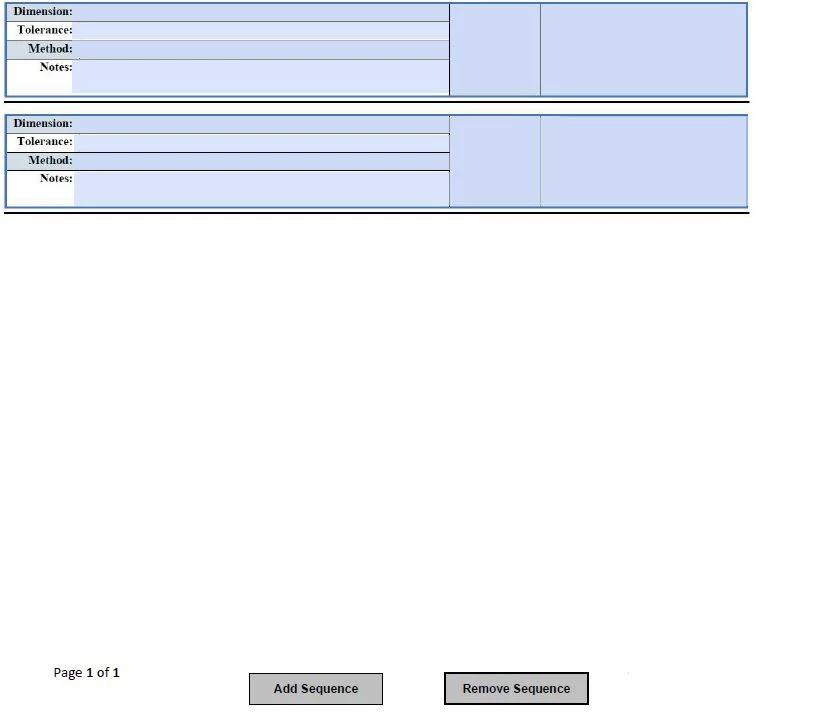
My form has a set of fields that I'd like the user to determine how many are necessary. Each block of fields is the same.

I'm trying to get the 'Add Sequence' button to display the hidden fields below the preceding fields. Currently, my button works to display 1 block of fields, but I'm

wondering if it's possible to get the 'Add Sequence' button to display a sequential hidden field each time it's clicked.

This topic has been closed for replies.
Correct answer Thom Parker

Is it possible to use that code    this.getField("Block1").hidden = false; multiple times on the same button to make it so that each sequential click will hide/show the next block ?


Yes, this can be done, as I've described in the previous response. The key is keeping track of what's visible, as both try and I have stated

There's a couple of ways to do this. Here's an easy one.

1. Put a hidden text field on the form named "SeqNum". Default it to a value of 1.

2. Put this code in the button that shows the blocks

var nNum = ++this.getField("SeqNum").value;

if(nNum < 6)

     this.getField("Block" + nNum).hidden = false;

This code handles up to 5 blocks.

1 reply

try67
Community Expert
Community Expert
December 1, 2017

It's possible, but it would require using a script, as you'll need to keep track of which fields are currently visible and which ones are not.

Thom Parker
Community Expert
Community Expert
December 1, 2017

I could have sworn I already answered this yesterday.  Maybe this is a re-post to another topic? Anyway, here is may answer

Yes, this is possible.  The fields need to be named in such a way that the blocks are grouped for hiding and showing, and for determining order of visibility. For example, Block1.dimension, Block1.method etc. 

Now this code will show all fields in block 1

this.getField("Block1").hidden = false;

Keep track of the sequence by looking at which blocks are hidden or shown. 

If there are page graphics and text involved, it gets more difficult. The only way to hide/show page content is with OCGs, also called layers.  There are a number of preflight tools for attaching content and fields to OCG layers (which is actually another way to show/hide form fields).  There are also ways to build a page by combining multiple pages, with each placed on a different OCG layer.

Thom Parker - Software Developer at PDFScriptingUse the Acrobat JavaScript Reference early and often
ryanm45904805
Participant
December 4, 2017

Is it possible to use that code    this.getField("Block1").hidden = false; multiple times on the same button to make it so that each sequential click will hide/show the next block ?