


karth80472045
Inspiring
October 31, 2016
Question

split PDF files based on csv file input

  • October 31, 2016
  • 1 reply
  • 1429 views

Hello everyone,

i have merged pdf files of about 120 pages i want to split this pages based on csv data the below image is csv file data
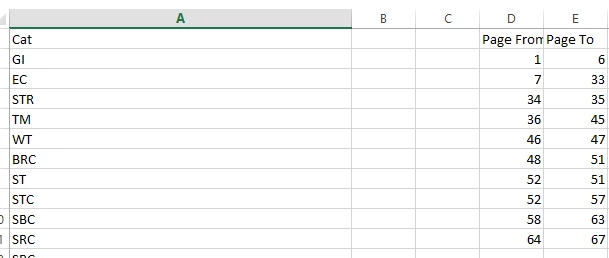
column A contains data column D and E contains page from and to details i want to split pdf files based on csv file for example  page from 1 to 6 it should split and save as GI file name and page 7 to 33 it should split and save as EC

can anybody help me this is possible through script .

please anybody help me

This topic has been closed for replies.

1 reply

Karl Heinz  Kremer
Community Expert
Community Expert
October 31, 2016

Take a look at the Doc.extractPages() method: Acrobat DC SDK Documentation - Doc.extractPages()

To get the CSV file into your script, you can use the util.readFileIntoStream() method, it's documentation has sample code that shows how to then convert that into a string: Acrobat DC SDK Documentation - util.readFileIntoStream()

karth80472045
Inspiring
October 31, 2016

hello sir ,

thanks for the reply i know how to code in adobe illustrator but for the first time i am going to write in adobe acrobat can you show the example code , also adobe extend script toolkit we can write the code .

Karl Heinz  Kremer
Community Expert
Community Expert
October 31, 2016

Acrobat does not use ExtendScript, it's JavaScript implementation is completely different than what you find in e.g. Illustrator, Photoshop or InDesign. To get a better understanding of how Acrobat JavaScript works, you will have to use the Acrobat SDK documentation (I've liked to two pages in that documentation, by using the navigation pane on the left, you can get to other parts. Start with the document "Developing Acrobat Applications Using JavaScript": Acrobat DC SDK Documentation

And from there, move on to the reference document. If you want a simple introduction to the basics of JavaScript for Acrobat, take a look at this book: Beginning JavaScript for Adobe Acrobat  - however, if you already know the core language from working in ExtendScript, that may be a bit too basic.

Here is what you need to do:

Read your CSV file into a stream and convert the stream to a string

Parse the string and get the different elements for each line in your CSV file

Loop over all the lines in your CSV and get the start and end page of your section

extract the pages based on that information

save the file using the appropriate filename