


Inspiring
Jun 16, 2020 10:04 AM UTC
Answered

Strange characters of options tab on checkbox.

This is a simple question about the checkbox. My environment is not English.

When I create a check box, the following strange characters appear in the Export Value field in the Options tab. I'm guessing it's probably garbled for some reason.

・・0o0D
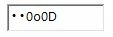
Previously, some operation code related to checkboxes did not work as intended. I didn't understand the cause at all so I was like addicted anything to it for a few days. Finally, I was gazing at this strange characters. I tried rewriting this to "On" and it suddenly started to work.


What was originally written here? And is this a non-English versions bug?

This topic is closed to new replies. Start a new post to keep the conversation going.
yukinohanaCorrect answer
Inspiring
Jun 16, 2020 11:59 AM UTC

Thank you!  And your hairstyle is awesome! I love it.

5 replies

JR Boulay
Community Expert
Community Expert
Jun 16, 2020 12:06 PM UTC

😉

Translate
Acrobate du PDF, InDesigner et Photoshopographe
JR Boulay
Community Expert
Community Expert
Jun 16, 2020 11:24 AM UTC

You can use anything as export value, except "Off" which is the value returned when the box is not checked.

Translate
Acrobate du PDF, InDesigner et Photoshopographe
yukinohanaAuthorCorrect answer
Inspiring
Jun 16, 2020 11:59 AM UTC

Thank you!  And your hairstyle is awesome! I love it.

Translate
Bernd Alheit
Community Expert
Community Expert
Jun 16, 2020 10:10 AM UTC

The export value of new checkboxes is "Yes".

Translate
Inspiring
Jun 16, 2020 10:50 AM UTC

Thank you very much. So is the basics to enter here "Yes" or "No"? Or is it okay to specify anything?

Translate