
sw777
Known Participant
February 19, 2017
Answered

Sum numeric fields based on selected checkboxes

  • February 19, 2017
  • 3 replies
  • 7900 views

I have an Adobe Acrobat form with seven (7) text boxes that contain numeric fields formatted as currency. These are the fees for each subject in a course.

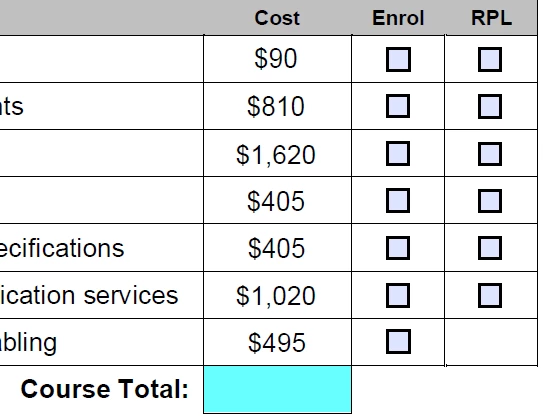
Beside each fee there are two checkboxes that operate exclusively (like radio buttons). The Export Values for each of the two checkboxes are Enrol and RPL.

Here's a screenshot of part of the form...
The textbox field names are as follows...

E101-fee

E102-fee

E104-fee

E105-fee

E107-fee

F102-fee

F104-fee

At the bottom of the form is another currency text field named CourseFee (highlighted blue).

I need the course fee to sum the fees in the other seven text fields, but I only want to include those with the associated "Enrol" checkbox selected. If "RPL" is selected there will be no charge for that subject.

The "Enrol" and "RPL" checkboxes are automatically selected in specific configurations when exclusive checkboxes A, B, or C are selected (these are on another part of the form and are working perfectly). Clicking "A" selects all "Enrol" boxes, "B" selects "RPL" for 5 and "Enrol for 2, "C" selects "RPL" for 6 and "Enrol" for 1.

After this pre-selection occurs and the CourseTotal is displayed, any of the "Enrol" or "RPL" checkboxes can be subsequently changed and the CourseTotal is to update immediately.

Any help would be greatly appreciated.

This topic has been closed for replies.
Correct answer try67

You can use this code as the custom calculation script of your CourseFee field:

var fields = ["E101", "E102", "E104", "E105", "E107", "F102", "F104"];

var total = 0;

for (var i in fields) {

    if (this.getField(fields).value=="Enrol") {

        total+=Number(this.getField(fields+"-fee").value);

    }

}

event.value = total;

3 replies

K-KAB
Participant
June 14, 2021

@try67Hoping you can help me figure this one out; I thought I had it, but it isn't working--I just continue to get a zero value regardless if the checkmark is "yes" or "no".

If the checkbox (circled in red) is checked, then I want it to add the coresponding value (circled in blue are hidden fields with default values matching the hours listed).

My checkboxes are named Core1, Core2, Core3, etc.; my hidden text fields are listed as CoreHours1, CoreHours2, CoreHours3, etc.

Below is a snip of my file as well as a snip of the code I'm trying to use.

try67
Community Expert
Community Expert
June 14, 2021

Post the full code as text, or share the file with us, please.

K-KAB
Participant
June 14, 2021

File attached. Thank you!

June 9, 2020

@try67.  I am trying to write code for when a checkbox is selected a fee will calculate based on Subtotal and Tax boxes multiplied by .035

So if Checbox7 is selected (Subtotal + Tax) * .035

try67
Community Expert
Community Expert
June 9, 2020

And if it's not?

June 9, 2020

It is just 0 if not.

try67
Community Expert
Community Expert
February 19, 2017

What are the names of the check-box fields?

sw777
sw777Author
Known Participant
February 19, 2017

E101

E102

E104

E105

E107

F102

F104

try67
Community Expert
try67Community ExpertCorrect answer
Community Expert
February 19, 2017

You can use this code as the custom calculation script of your CourseFee field:

var fields = ["E101", "E102", "E104", "E105", "E107", "F102", "F104"];

var total = 0;

for (var i in fields) {

    if (this.getField(fields).value=="Enrol") {

        total+=Number(this.getField(fields+"-fee").value);

    }

}

event.value = total;