Participant
July 8, 2016
Answered

Tabs in Adobe DC Pro

  • July 8, 2016
  • 2 replies
  • 866 views

Hello,

I am unable to set Adobe Acrobat DC Pro so that it displays several documents in tabs and not separate windows. I checked in the preferences but I have no tab option mentioned as it should (if I understood well) have.

Could you tell me how to fix this?

Many Thanks

S.

This topic has been closed for replies.
Correct answer Karl Heinz Kremer

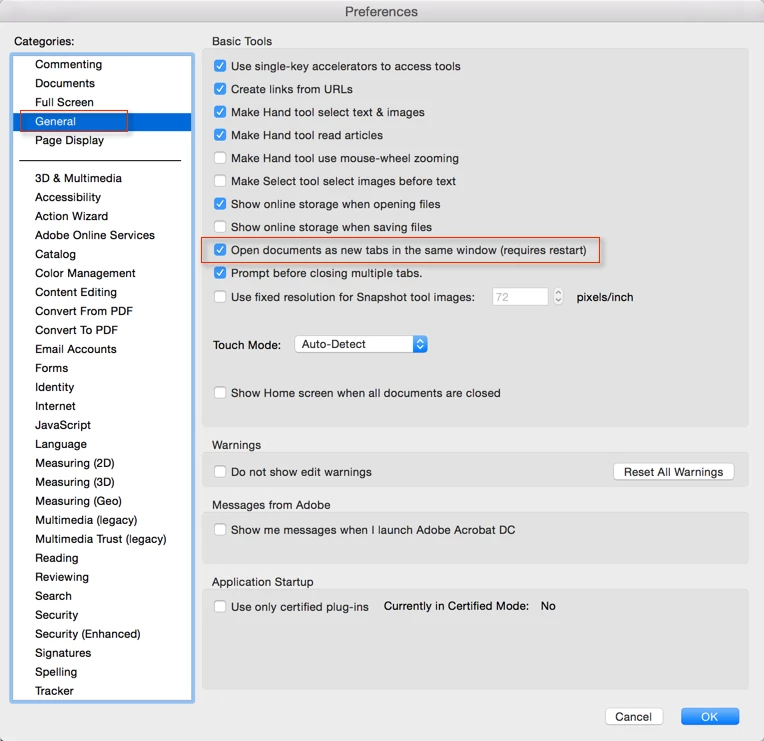
If you have Adobe Acrobat DC (or Reader DC), you should find this setting in Preferences>General:

If it's not there, I would try to repair my Acrobat installation. With the Windows version, you can find the Repair option in Acrobat's Help menu. Unfortunately, the Mac version does not have such a repair function.

2 replies

Legend
July 8, 2016

Not available if you have the permant license.

Karl Heinz  Kremer
Community Expert
Community Expert
July 8, 2016

Ah, that always trips me up. Thanks.

Karl Heinz  Kremer
Community Expert
Karl Heinz KremerCommunity ExpertCorrect answer
Community Expert
July 8, 2016

If you have Adobe Acrobat DC (or Reader DC), you should find this setting in Preferences>General:

If it's not there, I would try to repair my Acrobat installation. With the Windows version, you can find the Repair option in Acrobat's Help menu. Unfortunately, the Mac version does not have such a repair function.