
Participant
February 13, 2017
Answered

Text Callout not working

  • February 13, 2017
  • 2 replies
  • 2240 views

I'm trying to insert Text callout, however its not showing up. It only showing the annotation box without arrow pointer. Please refer the code mentioned below:

var link = "http://www.example.com/";

var spans = new Array();

  spans[0] = new Object();

  spans[0].text = "Links to: ";

  spans[0].textSize = 12;

  spans[0].textColor = color.red;

  spans[1] = new Object();

  spans[1].text = link;

  spans[1].textSize = 12;

  spans[1].textColor = color.black;


var
annot = this.addAnnot({ page: 0, type: "FreeText", intent: "FreeTextCallout", rect: [10, 10, 10, 10], richContents: spans });
This topic has been closed for replies.
Correct answer Joel Geraci

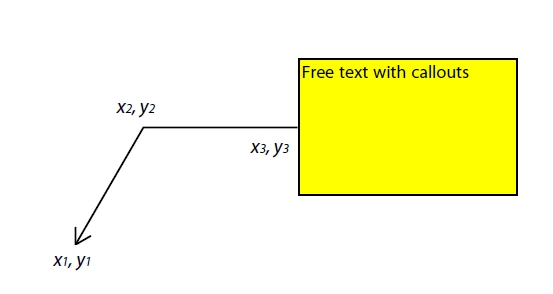
Adding to Karl's answer. You need to specify the coordinates for the arrow in the "callout" property, an array of 6 numbers. See the graphic below.

2 replies

Karl Heinz  Kremer
Community Expert
Community Expert
February 13, 2017

You also need to provide the information for the 'callout' property to the annotation object:

Acrobat DC SDK Documentation - Annotation.callout

In general, it's always a good idea to reverse engineer something that you cannot get to work: Create a document with just a manually added callout annotation, and then "dig around" in it to find how it is created. You can then try to implement that same behavior in software.

Participant
March 4, 2024

I am confused. Why am I doing all this work. I am paying for a product - that product should be able to perform a basic function

try67
Community Expert
Community Expert
February 13, 2017

Why would there be an arrow in a free-text annotation?

On Mon, Feb 13, 2017 at 4:32 PM, rahuld25915234 <forums_noreply@adobe.com>

Participant
February 13, 2017

When I refered the docs its mentioned to include `intent: "FreeTextCallout"` along with `type: "FreeText"`. Please correct me if I have mistaken?

Joel Geraci
Community Expert
Joel GeraciCommunity ExpertCorrect answer
Community Expert
February 13, 2017

Adding to Karl's answer. You need to specify the coordinates for the arrow in the "callout" property, an array of 6 numbers. See the graphic below.