


Text Field Calculations with Checkbox Activation Canceling Each Other Out
Hi, I have minumal experience in Java/coding, but understand the basics due to some programming classes I've taken in the past. I'm making an order form that a customer can change the quantity entered and add it to their order with a Checkbox. There is a suggested quantity that will already be entered. I have managed to create multiple Text fields with a script to calculate the price(Total) that is activated by a Checkbox. Next to each Text field is the Checkbox that turns the field "Off" or "On". It works fine with one, but I have 7 and each time I enter a new calualation in a new, unrelated field, it randomely cancels out the some of fields above it. See below. All are checked, so all should have the Total price entered.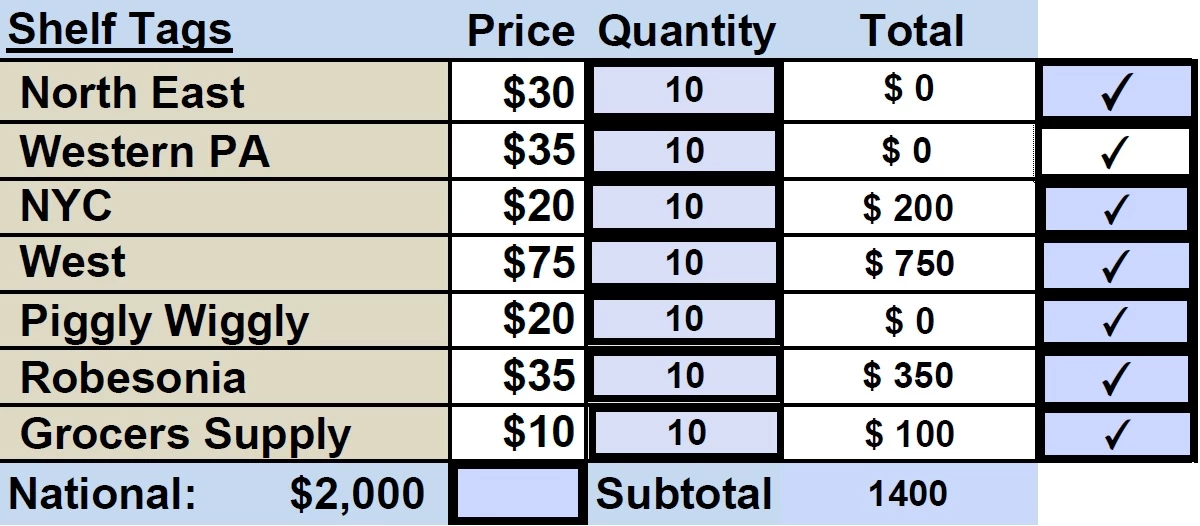
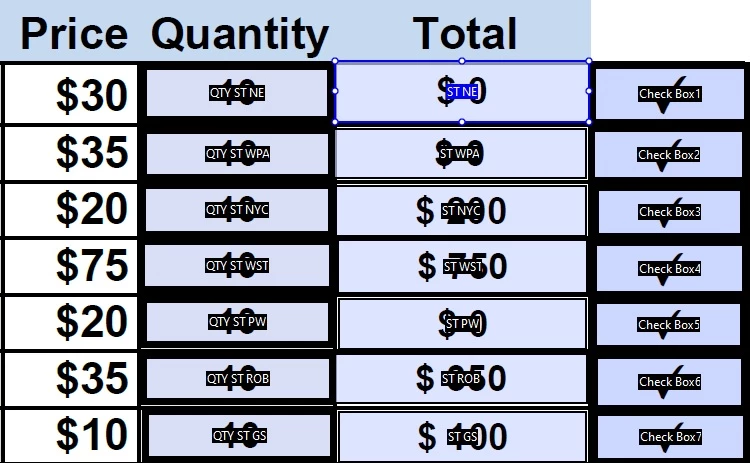
I was originally using these scripts in each of the Total Text fields.
- event.target.value=this.getField("QTY ST NE").value*30; event.value = 0;(this.getField("Check Box1").value!="On")
- event.target.value=this.getField("QTY ST WPA").value*35; event.value = 0;(this.getField("Check Box2").value!="On")
- event.target.value=this.getField("QTY ST NYC").value*20; event.value = 0;(this.getField("Check Box3").value!="On")
- event.target.value=this.getField("QTY ST WST").value*75; event.value = 0;(this.getField("Check Box4").value!="On")
- event.target.value=this.getField("QTY ST PW").value*20; event.value = 0;(this.getField("Check Box5").value!="On")
- event.target.value=this.getField("QTY ST ROB").value*35; event.value = 0;(this.getField("Check Box6").value!="On")
- event.target.value=this.getField("QTY ST GS").value*10; event.value = 0;(this.getField("Check Box7").value!="On")
I thought it might have something to do with the Checkbox value only being listed as "On". So I changed the code to this, which also works for only one Text field:
this.getField("Check Box1").value!="On";event.target.value=this.getField("QTY ST NE").value*30;this.getField("Check Box1").value!="Off";event.value = 0
I cannot figure out how to fix the probem and don't understand why an additional Text field would alter the result of another, with no coding related to it.
I thought the file might be corrupted and started from scratch, but experienced the same problem.
I'm really hoping this is a simple fix/oversite on my end, like changing the name of the of the Quantity Textboxes.
Thanks

 AdChoices