


philbanks76
Participating Frequently
September 22, 2016
Question

Text fields with the same name - stopped working

  • September 22, 2016
  • 2 replies
  • 769 views

Hi,

It used to be you could have the same named Text Field on pages, so users can carry through content. I cannot get this to work now. What's changed? anybody else having the issue? how can overcome this?

Take the attached very basic PDF as test (I can't believe we can't attach files - here's a WeTransfer link - WeTransfer

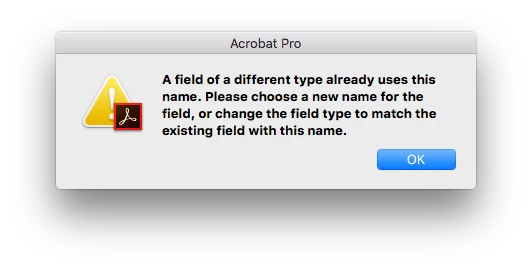
Two pages. Page one with the text field name of name: TF1, page two with the text field name of name: TF1. In the past this has worked fine, however now it will not allow it, and automatically is creating different field names upon opening the file in Acrobat Pro. Yet, it also will not allow me to rename the Text fields through Acrobat Pro, i get the following error.

Any ideas??
Thanks,

Phil

This topic has been closed for replies.

2 replies

JR Boulay
Community Expert
Community Expert
September 23, 2016

OK. I misunderstood.

Acrobate du PDF, InDesigner et Photoshopographe
Inspiring
September 23, 2016

To illustrate the strangeness, when you execute this code:

console.println(getField("TF1").type);

it prints out "true".

When you look at the internals of the PDF, there is are two widgets of a field named TF1, but the structure is wrong. Stay tuned...

philbanks76
Participating Frequently
September 23, 2016

Thanks so much George - really appreciate this. If worst comes to the worst, i'll need to go through and manually edit all the files, but something strange is happening. (not just my computer either, i've tried it on 3 different ones)

Thanks again

Inspiring
September 23, 2016

Weird stuff like this with fields created in InDesign are a big reason I usually create the fields in Acrobat. It should be considered a bug in InDesign with the way it generates fields.

JR Boulay
Community Expert
Community Expert
September 23, 2016

Hi.

Your PDF file works fine and as expected for me.

On page 1 the text field is named: TF11

On page 2 the text field is named: TF12

So they don't have the same name and they don't share their content.

I can rename TF12 as TF11 without any issue (see: https://framadrop.org/r/OS5cQ7a6Ra#XOy35UbPnKpAXblazHpUy9u/yyeOTGPrkk6ol0TXpHc=  ).

.

Acrobate du PDF, InDesigner et Photoshopographe
Inspiring
September 23, 2016

JR,

The problem is they should have the same name (TF1) and they had the same name in InDesign. I'll do some more analysis later today and provide more details.