



Kris Hunt
Legend
December 20, 2016
Answered

The value entered does not match the format of the field

  • December 20, 2016
  • 1 reply
  • 1080 views

Okay, hopefully the last question of the day...

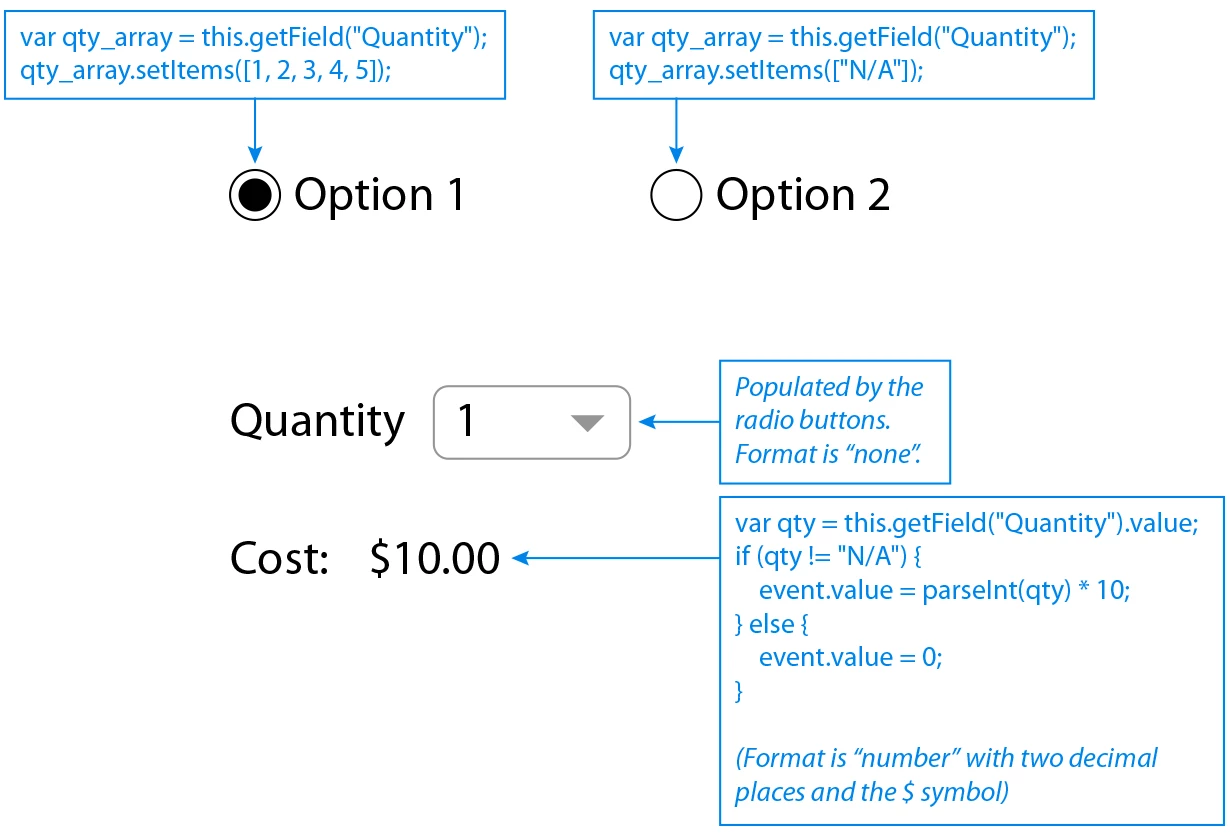
I've simplified my problem down to the following: I have two radio buttons that, when clicked, populate a combobox with a set of options. The first set consists of the numbers 1-5, and the second is simply the string "N/A". Then down below, a numeric Cost field will check to see if the contents of the Quantity field is not "N/A", and if it's not, it will turn the quantity string into an integer and multiply it by 10. Otherwise, if it is "N/A", it will return 0.

The problem is that, as soon as you click on either radio button, Acrobat gives the error "The value entered does not match the format of the field [ Cost ]". So it sounds like Cost is expecting an integer and receiving a string, but I'm not sure why it would be getting a string. Other than that, it works as expected.

This topic has been closed for replies.
Correct answer try67

Use this code for the Cost field:

var qty = this.getField("Quantity").valueAsString;

if (qty != "N/A") {

    event.value = Number(qty) * 10;

} else {

    event.value = 0;

}

1 reply

try67
Community Expert
Community Expert
December 20, 2016

Why is the Quantity field a drop-down if it has a calculated value? It would make more sense to use a text field.

Try changing the format of the Cost field to None and see what the results are.
If you can't get it to work please share the file with us.

Kris Hunt
Kris HuntAuthor
Legend
December 20, 2016

Changing the format of Cost to none does indeed eliminate the error. But I would really like the result to be formatted as a dollar amount, since that's the way the other fields on the page are formatted.

The Quantity field is a drop-down because I want the user to be able to select from a limited set of quantities. A text field would allow them to enter any quantity. The available quantities change based on what option they select.