
Question
Unable to see button added on edit toolbar using plugin
Hi,
I was building a plugin for acrobat pro that adds a button to the edit toolbar and the button calls a function to add annotation to the selected text. I am using the Basic Plugin as my base and making changes to the BasicPluginInit.cpp file. I tried to replicate what I saw in the documentation here-
https://opensource.adobe.com/dc-acrobat-sdk-docs/library/plugin/Plugins_Toolbutton.html
Unfortunately, even though my plugin builds and I place the .api file at the correct address I am not able to see any additional items on the edit toolbar.
Here is the code for my init.cpp file-
/*********************************************************************

 ADOBE SYSTEMS INCORPORATED
 Copyright (C) 1998-2006 Adobe Systems Incorporated
 All rights reserved.

 NOTICE: Adobe permits you to use, modify, and distribute this file
 in accordance with the terms of the Adobe license agreement
 accompanying it. If you have received this file from a source other
 than Adobe, then your use, modification, or distribution of it
 requires the prior written permission of Adobe.

 -------------------------------------------------------------------*/
/**
 \file BasicPluginInit.cpp

 - Skeleton .cpp file for a plug-in. It implements the basic
   handshaking methods required for all plug-ins.
 - A convenient function is provided to add a menu item easily.

*********************************************************************/

// Acrobat Headers.
#ifndef MAC_PLATFORM
#include "PIHeaders.h"
#endif

/*-------------------------------------------------------
	Constants/Declarations
-------------------------------------------------------*/
// stuff for Menu set up
static AVMenuItem menuItem = NULL;
ACCB1 ASBool ACCB2 PluginMenuItem(char* MyMenuItemTitle, char* MyMenuItemName);

// callback functions implemented in file "BasicPlugin.cpp"
extern ACCB1 void ACCB2 MyPluginCommand(void *clientData);
extern ACCB1 ASBool ACCB2 MyPluginIsEnabled(void *clientData);
extern ACCB1 ASBool ACCB2 MyPluginSetmenu();
extern ACCB1 void ACCB2 AcroAppModeSwitchNotification(void* clientData);
extern const char* MyPluginExtensionName;

/*-------------------------------------------------------
	Annotation helper / toolbar additions
-------------------------------------------------------*/
// Global references for toolbar button and its callback so we can release during unload
static AVToolButton CreateAnnotButton = NULL;
static ASCallback gCreateAnnotExecCB = NULL; // store as ASCallback

// Forward declaration
static ACCB1 void ACCB2 CreateSampleAnnotExecute(void* clientData);

static void AddCreateAnnotationToolButton()
{
	const char* toolbarName = "UndoRedo";
	AVToolBar toolBar = AVAppGetToolBarByName(toolbarName);
	if (!toolBar)
		return;
	if (CreateAnnotButton)
		return;
	AVIcon icon = NULL;

	CreateAnnotButton = AVToolButtonNew(ASAtomFromString("MyExtn:CreateAnnotButton"), icon, false, false);
	if (!CreateAnnotButton)
		return;
	gCreateAnnotExecCB = ASCallbackCreateProto(AVExecuteProc, &CreateSampleAnnotExecute);
	AVToolButtonSetExecuteProc(CreateAnnotButton, (AVExecuteProc)gCreateAnnotExecCB, NULL);
	AVToolBarAddButton(toolBar, CreateAnnotButton, false, NULL);
}

static void CreateSimpleTextAnnotation()
{
	AVDoc avDoc = AVAppGetActiveDoc();
	if (!avDoc) { AVAlertNote("No active document."); return; }
	PDDoc pdDoc = AVDocGetPDDoc(avDoc);
	PDPage page = PDDocAcquirePage(pdDoc, 0);
	DURING
	{
		ASFixedRect fr;
		fr.left = ASInt32ToFixed(36);
		fr.right = ASInt32ToFixed(136);
		fr.top = ASInt32ToFixed(792 - 36);
		fr.bottom = ASInt32ToFixed(792 - 136);
		PDAnnot annot = PDPageCreateAnnot(page, ASAtomFromString("Text"), &fr);
#ifdef CastToPDTextAnnot
		PDTextAnnot textAnnot = CastToPDTextAnnot(annot);
#else
		PDTextAnnot textAnnot = (PDTextAnnot)annot;
#endif
		const char* contents = "Created by toolbar button.";
		PDTextAnnotSetOpen(textAnnot, true);
		PDTextAnnotSetContents(textAnnot, contents, (ASInt32)strlen(contents));
		PDPageAddAnnot(page, -2, textAnnot);
		AVPageView pv = AVDocGetPageView(avDoc);
		if (pv) {
			AVRect devRect; ASFixedRect fixedRect = fr; AVPageViewRectToDevice(pv, &fixedRect, &devRect); AVPageViewInvalidateRect(pv, &devRect);
		}
	}
	HANDLER { AVAlertNote("Failed to create annotation (exception)."); }
	END_HANDLER
	PDPageRelease(page);
}

static ACCB1 void ACCB2 CreateSampleAnnotExecute(void* clientData)
{
	CreateSimpleTextAnnotation();
}

/*-------------------------------------------------------
	Core Handshake Callbacks
-------------------------------------------------------*/

/**
	Callback invoked by the application to give the plug-in an opportunity to register
	an HFTServer with the application.
	@return true to indicate the plug-in should continue loading.
*/
ACCB1 ASBool ACCB2 PluginExportHFTs(void)
{
	return true;
}

/**
	The application calls this function to allow it to
	<ul>
	<li> Import plug-in supplied HFTs.
	<li> Replace functions in the HFTs you're using (where allowed).
	<li> Register to receive notification events.
	</ul>
*/
ACCB1 ASBool ACCB2 PluginImportReplaceAndRegister(void)
{
	return true;
}

/**
	The main initialization routine.
	We register our action handler with the application.
	@return true to continue loading the plug-in
	@return false to cause plug-in loading to stop.
*/
/* PluginInit
** ------------------------------------------------------
**
** The main initialization routine.
**
** Return true to continue loading plug-in.
** Return false to cause plug-in loading to stop.
*/
ACCB1 ASBool ACCB2 PluginInit(void)
{
	//Register for mode switch notification.
	AVAppRegisterNotification(AcroAppModeSwitchNSEL, gExtensionID,
		(void*)ASCallbackCreateNotification(AcroAppModeSwitch, AcroAppModeSwitchNotification), NULL);

	ASBool ok = MyPluginSetmenu();
	// Add our toolbar button after menus
	AddCreateAnnotationToolButton();
	return ok;
}

/**
	The unload routine.
	Called when your plug-in is being unloaded when the application quits.
	Use this routine to release any system resources you may have
	allocated.

	Returning false will cause an alert to display that unloading failed.
	@return true to indicate the plug-in unloaded.
*/
ACCB1 ASBool ACCB2 PluginUnload(void)
{
	if (menuItem)
		AVMenuItemRemove(menuItem);
	if (gCreateAnnotExecCB)
		ASCallbackDestroy(gCreateAnnotExecCB);
	gCreateAnnotExecCB = NULL;
	CreateAnnotButton = NULL;
	return true;
}

/**
	Return the unique ASAtom associated with your plug-in.
	@return the plug-ins name as an ASAtom.
*/
ASAtom GetExtensionName()
{
	return ASAtomFromString(MyPluginExtensionName);
}


/**
	Function that provides the initial interface between your plug-in and the application.
	This function provides the callback functions to the application that allow it to
	register the plug-in with the application environment.

	Required Plug-in handshaking routine: <b>Do not change it's name!</b>

	@param handshakeVersion the version this plug-in works with. There are two versions possible, the plug-in version
	and the application version. The application calls the main entry point for this plug-in with its version.
	The main entry point will call this function with the version that is earliest.
	@param handshakeData OUT the data structure used to provide the primary entry points for the plug-in. These
	entry points are used in registering the plug-in with the application and allowing the plug-in to register for
	other plug-in services and offer its own.
	@return true to indicate success, false otherwise (the plug-in will not load).
*/
ACCB1 ASBool ACCB2 PIHandshake(Uns32 handshakeVersion, void *handshakeData)
{

	//Enable the below code in #if 0 to make this plugin Acrobat only.
#if 0
	char* product = (char*)ASGetConfiguration(ASAtomFromString("Product"));
	if(strcmp(product,"Reader") == 0)
		return false;
#endif

	if (handshakeVersion == HANDSHAKE_V0200) {
		/* Cast handshakeData to the appropriate type */
		PIHandshakeData_V0200 *hsData = (PIHandshakeData_V0200 *)handshakeData;

		/* Set the name we want to go by */
		hsData->extensionName = GetExtensionName();

		/* If you export your own HFT, do so in here */
		hsData->exportHFTsCallback = (void*)ASCallbackCreateProto(PIExportHFTsProcType, &PluginExportHFTs);

		/*
		** If you import plug-in HFTs, replace functionality, and/or want to register for notifications before
		** the user has a chance to do anything, do so in here.
		*/
		hsData->importReplaceAndRegisterCallback = (void*)ASCallbackCreateProto(PIImportReplaceAndRegisterProcType,
																					 &PluginImportReplaceAndRegister);

		/* Perform your plug-in's initialization in here */
		hsData->initCallback = (void*)ASCallbackCreateProto(PIInitProcType, &PluginInit);

		/* Perform any memory freeing or state saving on "quit" in here */
		hsData->unloadCallback = (void*)ASCallbackCreateProto(PIUnloadProcType, &PluginUnload);

		/* All done */
		return true;

	} /* Each time the handshake version changes, add a new "else if" branch */

	/*
	** If we reach here, then we were passed a handshake version number we don't know about.
	** This shouldn't ever happen since our main() routine chose the version number.
	*/
	return false;
}

/*-------------------------------------------------------
	Menu Utility
-------------------------------------------------------*/

/**
	A convenient function to add a menu item under Acrobat SDK menu.
	@param MyMenuItemTitle IN String for the menu item's title.
	@param MyMenuItemName IN String for the menu item's internal name.
	@return true if successful, false if failed.
	@see AVAppGetMenubar
	@see AVMenuItemNew
	@see AVMenuItemSetExecuteProc
	@see AVMenuItemSetComputeEnabledProc
	@see AVMenubarAcquireMenuItemByName
	@see AVMenubarAcquireMenuByName
*/
ACCB1 ASBool ACCB2 PluginMenuItem(char* MyMenuItemTitle, char* MyMenuItemName)
{
	AVMenubar menubar = AVAppGetMenubar();
	AVMenu volatile commonMenu = NULL;

	if (!menubar)
		return false;

	DURING

   		// Create our menuitem
		menuItem = AVMenuItemNew (MyMenuItemTitle, MyMenuItemName, NULL, true, NO_SHORTCUT, 0, NULL, gExtensionID);
		AVMenuItemSetExecuteProc (menuItem, ASCallbackCreateProto(AVExecuteProc, MyPluginCommand), NULL);
		AVMenuItemSetComputeEnabledProc (menuItem,
				ASCallbackCreateProto(AVComputeEnabledProc, MyPluginIsEnabled), (void *)pdPermEdit);

		commonMenu = AVMenubarAcquireMenuByName (menubar, "ADBE:Acrobat_SDK");
		// if "Acrobat SDK" menu is not existing, create one.
		if (!commonMenu) {
			commonMenu = AVMenuNew ("Acrobat SDK", "ADBE:Acrobat_SDK", gExtensionID);
			AVMenubarAddMenu(menubar, commonMenu, APPEND_MENU);
		}

		AVMenuAddMenuItem(commonMenu, menuItem, APPEND_MENUITEM);

		AVMenuRelease(commonMenu);

	HANDLER
		if (commonMenu)
			AVMenuRelease (commonMenu);
		return false;
	END_HANDLER

	return true;
}
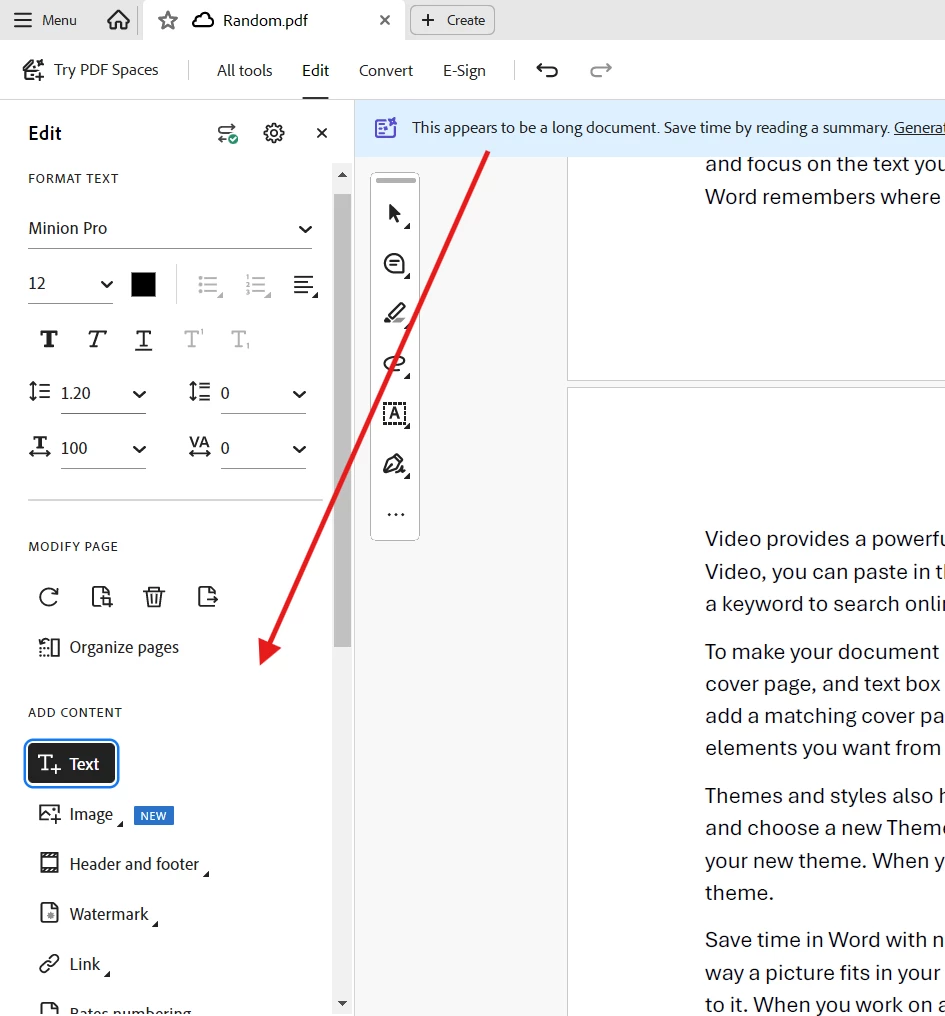
I am expecting an item to show up here-
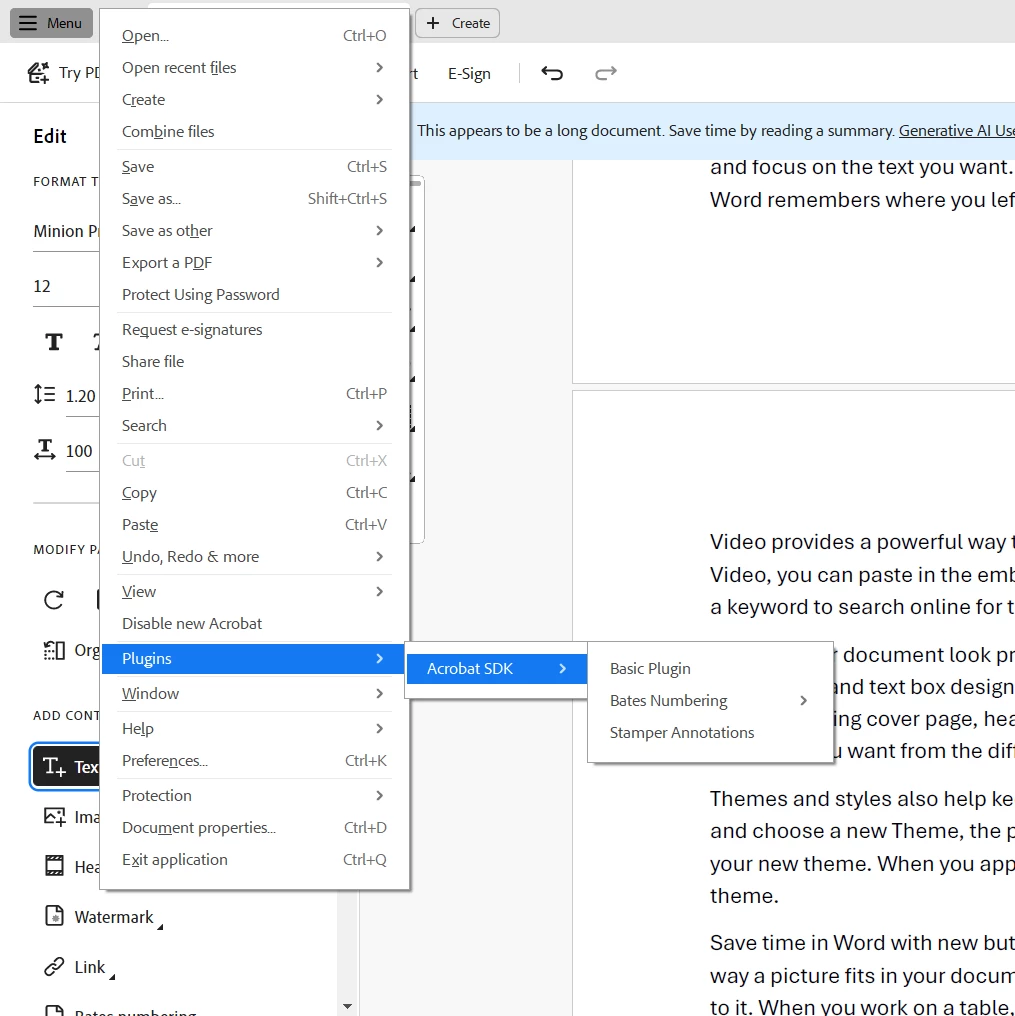
And I am able to see the plugin avalialble in the context menu-
Please let me know what I'm missing, Thanks!


 AdChoices