
Answered
Uploading images into fillable form Acrobat Pro DC
I am having trouble creating a button where you can upload an image into a fillable form. All of the instructions on this forum do not include options to do this in DC. There is no "Icon Only" choice in the Options tab under properties. I can input the script just fine. Anyone know of a way around this or am I doing something wrong? The options are clearly different in DC as opposed to other versions. Below are instructions that are posted:
In Acrobat DC:
- Open up the Prepare Form via Tools > Prepare Form
- Using the 'Add a button' tool (the symbol that has "ok" in it that states Add a "Print" or "Clear" or other type of button) draw a button to the size the image field needs to be
- Double click the button to enter into the button's properties
- Go to the Actions tab
- Next to Select Action choose 'Run a JavaScript'
- Click Add
- Copy & Paste the following JavaScript in the window: event.target.buttonImportIcon();
- OK
- Go to the Options tab
- Under Layout choose 'Icon Only'
- Investigate any other options you need then..
- Close
However, the bold instruction above is not available in DC. There is no layout option. Please see screen shot below:
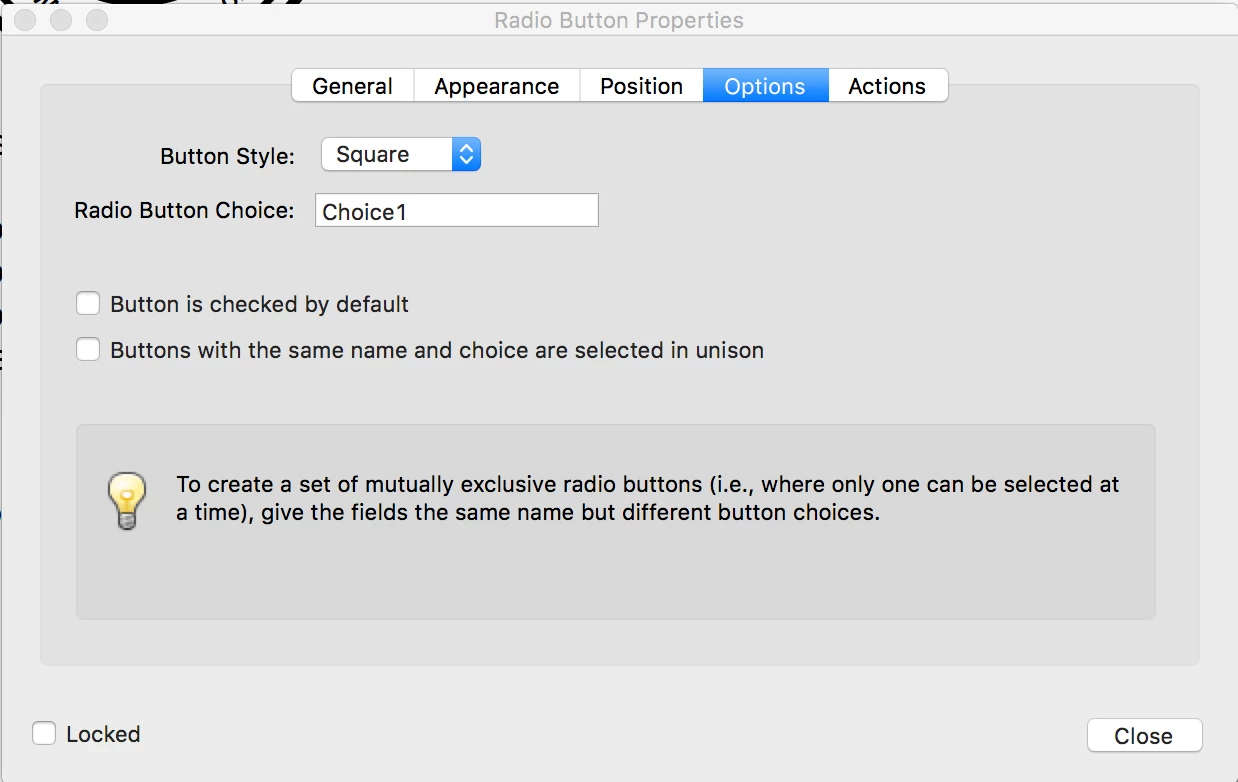
Any idea how I can go about this in Adobe Acrobat Pro DC?
Thanks!


 AdChoices